
- You are here:
- Home »
- Gadgets & Reviews
Category Archives for Gadgets & Reviews
Stay away from www.igotoffer.com (Fraud alert)
I thought I put it out there my recent experience with one of the website- igotoffer.com
So I was looking to trade a few of my old devices/ phones for cash. I checked the internet and found there are a lot of sites that accept trade-in phones and pay in cash via PayPal.
Upon comparison of quoted price, igotoffer.com had the best offer for my phones. I followed the process, created the online order, and sent them my iPhones. Here is what happened:
- I received a priority mail shipping label (generally other sites send you a cheaper label). It was a good feeling initially, but now that I realize, they are in a hurry to get their hands on your devices. Not a good sign.
- I received an email late evening that the phones are received. Late evening email made me think if it was a big company or some home-based operation. Nothing wrong with either but something to keep in mind- keep reading, more on this later.
- Immediately followed another email stating that my phones are not for the service provider (Verizon) that I put in the order for. They made it up that my phones are for “Simple Mobile”. Further, they now changed my offer to $200 from $446 originally quoted. Bummer. I was naturally mad and sense they are up-to something. I am holding receipts of my phone with listed serial numbers, so I am sure I know which phones I sent and which network they were for. Isn’t it?
- I refused to accept the lower offer. We made a few emails back and forth and they simply are not ready to pay more. I asked them to return my phones.
- They were instant in creating a return FedEx shipping label. Great, I thought.
- Now, I kept tracking FedEx. A week pass by and nothing happened. FedEx delivery date was long gone, as I was busy in life- never really tracked detailed status. I then checked the status since I did not receive phones as per FedEx’s estimated delivery date.
- FedEx tracking suggested that they have never received a package from the shipper. Still awaiting the package. So they never shipped the phone back. I was shocked and tried to reach out to them via Phone and Emails.
- I was told on phone and email, the package will be in the mail within 30 days of creating the return label. Wow- so they do not want to pay in full, and hold on to the devices for that long? I was now worried and suspected there is something wrong here. I kept reaching out to them for next few days to speed-up the process but the answer is same- “The package will be in the transit within 30 days.”
- I now suspected a fraud here: First they are not ready to do anything or help anything. They told me clearly, that there is nothing I can do- It willl take that long, no matter what. Second, they are not running really a big operation as based on my initial thought on receiving the package. Third, if they are so quick in checking receipt package, verifying devices nearly instantly, then what is preventing them to put that package back in FedEx? That is too for 30 days?
- Sadly, there is nothing I can do as they have my phones and I have no payment and no phone. I am at a total loss.
I have to admit that I should have done my research. Now that if I look for complaints, there are a lot of similar complaints on the internet for igotmyoffer.com.
Hopefully, my experience will help other unsuspected users.
Please stay away from igotoffer.com
Update (1/31/2021): After a tireless fight via email and phone calls, I was able to make them ship out my phones for real. I received the phones and quickly thanks to FedEx. Overall, the whole experience was a disaster and tremendous waste of energy and time.
The 5 Best Drones
Disclosure: As an Amazon Associate, Unwrittens earns from qualifying purchases. This never changes what we recommend.
Folks, honestly, coming up with this list of top five best drones was not really a walk in the park. Because, let’s face it; if you have been out and seriously seeking for a pretty good drone, then I am quite sure that you are probably not just looking out for any other drone besides the drone that befits your thoughts and preference.
Yet, preference for drone buyers differs very greatly. In fact, it is the very reason we got a diversity of drones in the market. So, the professional-type loves the drone with a great camera; the hobbyist adores the one with a superb battery, the drone-fanatics and the show-off (Mr. /Mrs. Beautiful) type on the other hand just cherishes the one with a killer looks and speed. Finally, the newbie too wishes to have the one with a fancy design and an easy-to-learn controller …good heavens! Preferences, preferences, and more drone preferences for every buyer! So, how do you really think we could combine all these numerous aspects to come out with this listing of the very best among all the best drones out there in the market?
Take it from us; no matter what your aim in buying a drone is, our top 5 listing surely got you covered. Well, you may wish to read a little further and find out why and what drone is likely to be on your buying list next time you intend to shop. But before I proceed further, I thought you may consider checking out our article on the vital features you will need to consider before buying yourself a new drone.
Let’s begin with:
Rank 1: DJI Mavic Pro …this thing flies like a pro.
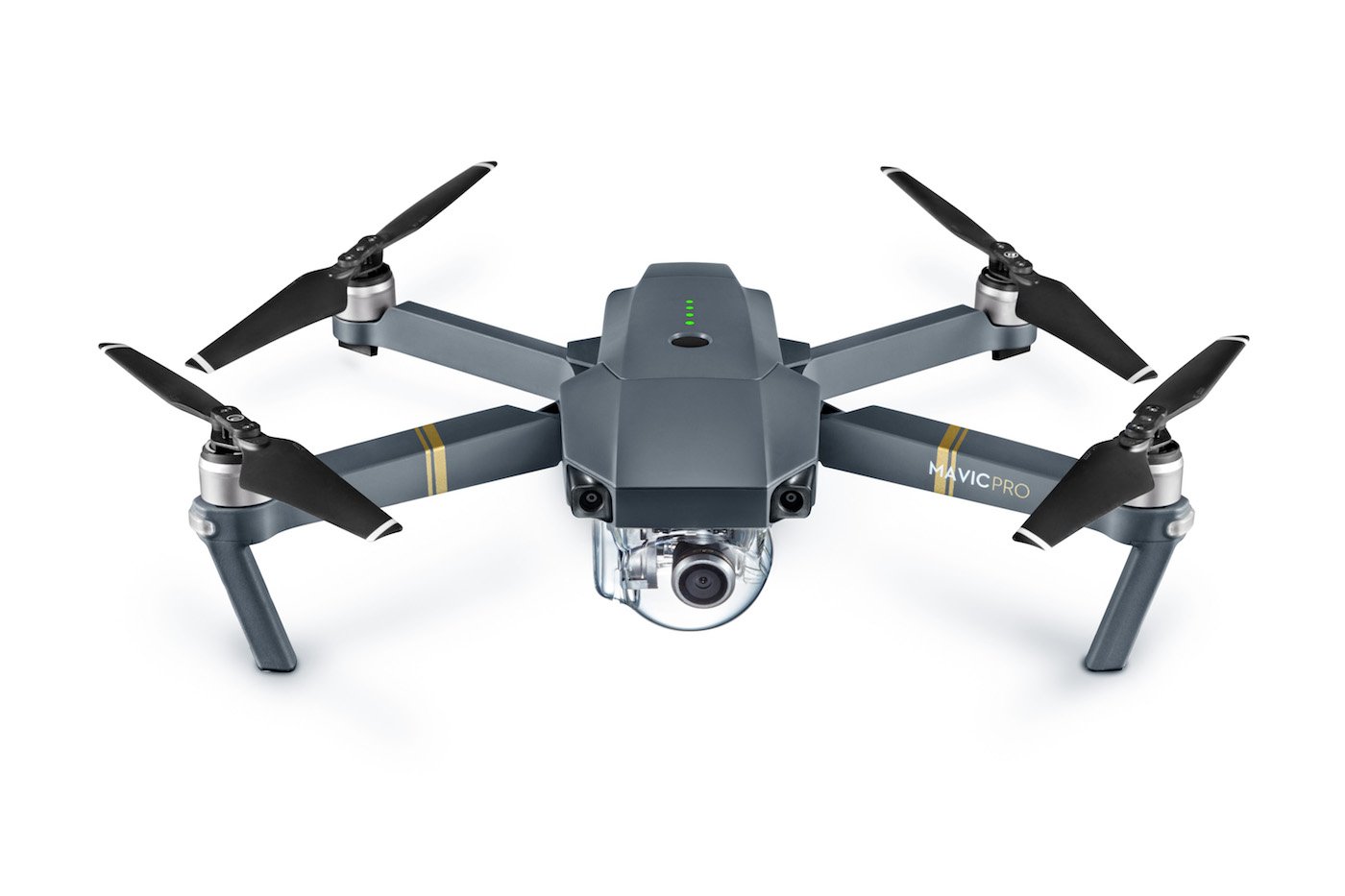
DJI Company is one miracle anyone can hardly phantom when it gets to designing drones. Perhaps you too may have used the awesome DJI Phantom 4 and wondered if there could be anything better in the industry. Well, apparently, DJI Mavic Pro is something better. It is tiny enough to fit in your trousers’ pocket or travel bag, great enough to shoot professional 4K videos and friendly enough to be controlled with a FPV controller and a VR-like headset. Yet with a rated flight time of 21 minutes and a control range of 4 miles, the small Mavic Pro will obviously fit to a list of any ideal drone buyer, whether a professional, novice or just a hobbyist. In simpler terms, this drone is the ultimate bot for 2017 and that is why it made its way up as the best drone in our top 5 ranking. Here is how the DJI Mavic Pro performs:
Features
- Camera: 12MP and video resolution of 4K relayed at speeds of 30 fps (frames per second).
- Battery time: 27 minutes (according to DJI, but could normally take about 20 – 25 minutes).
- Controller: App controlled and an accompanying headgear for easy control.
- Maximum Speed: 65KM/hr. (40mph).
- Control Range: 4 miles.
- Cost: between $999 and $1200
Pros:
- Cool design: the design of the DJI Mavic Pro is something no one could pass without noting. First, it has a simple, catchy design that can be reduced to fit in a pocket. Then comes the stylish front design of the camera caging that allows the camera to rotate with ease and protects it from being spoilt. Lastly, there comes that awesome VR-like headset that gives one the absolute feeling of being airborne.
- Portable: as noted before, this drone is very durable and it is best suited for people who love adventures.
- Great camera: this drone really has a great camera. 12MP is what they will tell you. But besides, it is very stable when shooting videos. Thus, its videos often lack the popular shakiness of drone videos. Thus is very awesome for professional users too.
- 21 minutes of flight time! Well, I can’t explain any further, can I?
- Longer control distance: this drone has a control distance of just about 4 miles. This certainly makes be in the same class as other popular professional drones out there.
- Pricing: this drone is currently priced at about $999. Certainly, I know that $999 is quite a fortune to spend. However, when considering its features, I think it is the best bargain it could be.
Cons:
The DJI Mavic Pro Short (a name given for the VR-like FPV headset) has got a somehow poor image relay to the headset and these goggles could give you some eye strain if you use them persistently. Besides that, I don’t really have an issue with the Mavic Pro yet. Do you? Please share with us.
Conclusion
Certainly, it could be very impossible to summarize all features of the DJI Mavic Pro in the few words used. This drone is a work of art both by looks and by performance. I know I have explored the main features of this small bot; however, I still missed to mention that the Mavic Pro is powerful too (it can carry quite a big load and still fly easily). It also has an enabled feature of obstacle avoidance among many other added features that make it so desirable. It may not remain as the best drone for the next 3-4 months (given the rapid increase in drone invention), but it certainly is the one device we all should watch out at the moment.
Rank 2: DJI Phantom 4
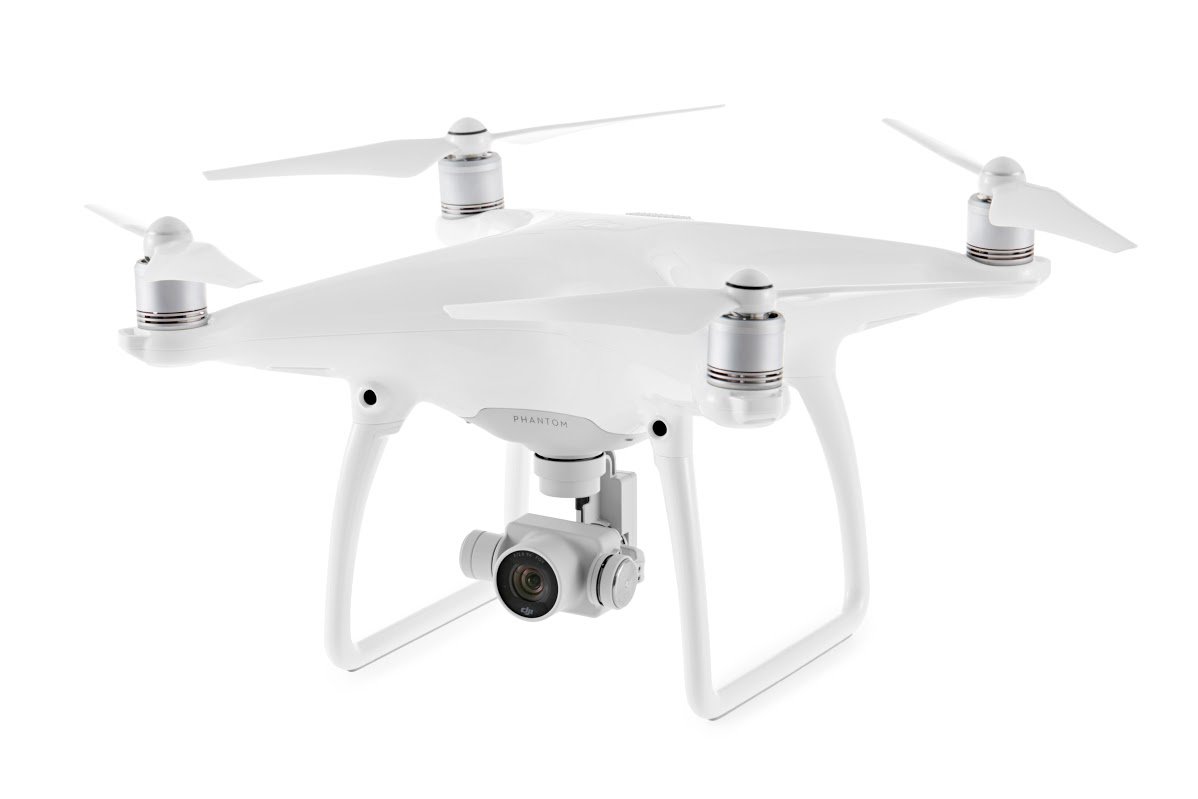
The DJI Phantom 4 is a drone that has made sales even in the markets where many other drone brands are striving just to make an entry. This trend is not without cause; DJI Phantom 4 quadcopter remains simply as the “most awesome boy” in the drone airwaves. Both in design and performance, this drone has been fitted to meet a variety of needs for various drone users. Thus, it has a pretty awesome outlook, a matching air stability (in fact, it can shoot videos in slow motion), a longer flight time and a generally better flight experience. If you are a professional looking for a super cool camera drone, there is no doubt that you will not regret buying this drone. But, first let’s have a look at its main features:
Features & Properties
- Camera: 12MP software support of Adobe DNG RAW.
- Video resolution: of 4K relayed at speeds of 30 fps (frames per second).
- Battery time: 30 minutes (according to DJI, but could normally take about 25 – 28 minutes).
- Controller: App controlled and an accompanying headgear for easy control.
- Maximum Speed: 65KM/hr. (40mph).
- Control Range: 4 miles.
- Cost: between $1399 and $1800
- Others: obstacle avoidance, 3D cameras for mapping, different flight modes to switch.
Pros:
- An awesome camera: one notable feature any user of the DJI Phantom 4 will never fail to spot is this drone’s camera. I mean, its camera is something else… 12MP is what all reviews tell you. But besides 12MP resolution, this drone’s camera and vision lens actually shoots very clear images and has an unmatched live streaming capability. Besides, it has embedded 3D cameras and an accompanying PC software support for mapping its flight area. This aids it to easily learn its environment and avoid collisions.
- Highly fault tolerant: nothing sucks like a drone that breaks just a day/two after being purchased. But this piece of magnesium-bodied bot is strong enough to survive normal drone crashes/collusions (if they ever occur). It also has a feature of obstacle avoidance that helps it to evade crashes. Thus, it is very durable.
- Longer flight time: the main notable difference between DJI Phantom 3 series and DJI Phantom 4 is that the latter has got a relatively longer flight time than the former. At least, on this we need not to argue, you only need to buy Phantom 4 and disproof if it isn’t.
- A great consumer support: DJI Phantom 4 (like many other DJI quadcopters) comes with a wide support on how to use the product. It even has video tutorials for beginners and this makes it one adorable option if you considered the 6 factors for a great drone (link article 1).
- This drone is pretty agile: If you love drone racing, then I think 45mph (actually I feel like it’s more than that) is perhaps what you have been looking for, and here it is!
Cons:
- Quite costly: priced at anything between $1399 and $1800 (depending on where you get it from), this price may somehow keep most buyers off its shelves. However, any true lover of drones will not feel this pinch in the wallet as most professional drones (besides Phantom 4) cost more than $2000.
Conclusion
DJI Phantom 4 is certainly a great performer in the airwaves. It has a great design and it is also truly durable. It may miss a bit due to its pricing or perhaps the fact that it is quite noisy too. However, generally, this drone is a piece worth its cost.
Rank 3: Yunec Typhoon H – this drone will fly minus one rotor
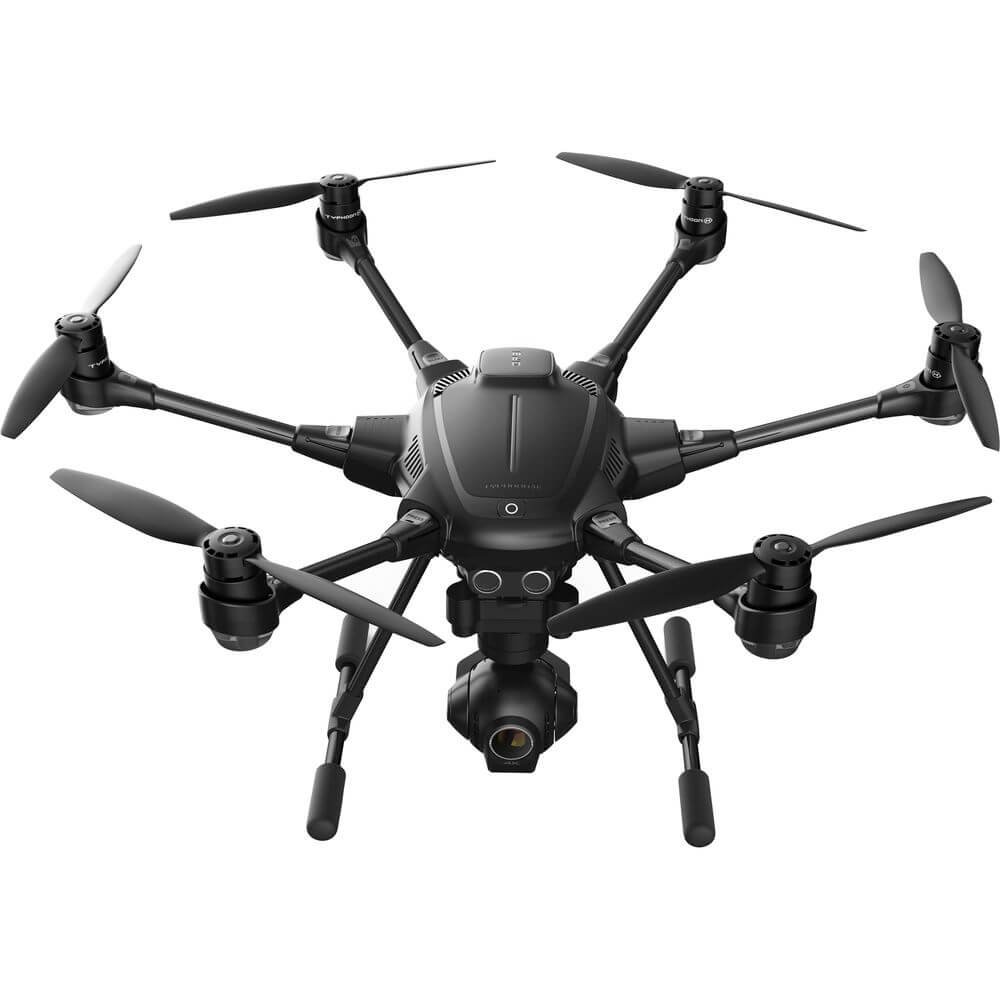
Yunec is not a very popular company like the DJI. However, so far, Yunec Typhoon happens to be the only drone in the market that I can comfortably rank as a match for DJI Phantom 4. This also happens to be the only hexacopter we got on our list. It can actually continue flying even when one propeller fails. Besides, it has some of the advanced features like the obstacle avoidance, 20 minutes flight time and a 360 degree camera gimbal. This certainly makes it quite a good option to opt for if you like to adventure in what could new and startling in technology. Here is how the Typhoon performs:
Features and Specs
- Camera: 12MP camera resolution (CGO3+).
- Video resolution: of 4K and supports UHD video streaming.
- Battery time: about 25 minutes of flight time.
- Controller: App controlled and an accompanying easy to use manual controller.
- Maximum Speed: about 40mph.
- Control Range: not specific, but it ranges between 3 and 4 miles.
- Cost: between $1199 and $1500
- Others: obstacle avoidance, different flight modes to switch.
Pros:
- It is very stable: the Yunec Typhoon is very stable on air and it has a way to cut through the air easily. Thus it has very little resistance on air even on strong wind resistance.
- Longer flight time: it has an averagely good flight time of about 20 to 25 minutes.
- 8 different flight modes: this feature makes it very easy to control the drone under varied environments.
- “Follow-me” feature: once you activate this feature, you can basically let Typhoon to hover and film around you like your pet.
- Easy to learn and fly.
Cons:
Not very durable: though priced very highly and with great features, this drone has attracted quite a number of negative reviews on its durability. Certainly this is one thing that could make you shy off purchasing this bot. However, if you are lucky to get a good one, you will not regret the purchase.
Conclusion:
Yunec Typhoon is quite a great piece of art in both design and performance. It is very tolerant to faults and can actually fly with 5 rotors, have awesome auto-takeoff and safe-landing features. It is very easy to learn and above all, it has got a very great camera for filming. If you are new to drones and you could afford some $1200; I would certainly recommend that you get this bot without hesitation. It is the easiest drone to fly.
Rank 4: Walkera QR X800 …folks, this guy will actually carry your Nikon camera!

It’s quite true that most drones from the East are a no match for drones manufactured here in the West. But when it comes to the Walkera Company’s QR X800, I certainly can place a bet on it! Sure. Of all the best drones dished out for aerial filming, the Walkera QR X800 happens to have been my personal favorite for a very long time now. This drone is quite huge; has a fancy design with a retractable drone landing gear. Besides, it has an awesome feature of thrust balancing using an inbuilt system of advanced FCS800 Multi-axis Control System. This drone is controlled by either a manual controller, an accompanying controller with FPV, or for app lovers, this drone still got you covered with an accompanying controller app. Now to affirm its durability, I may just have to mention that its casing is built with strong 3K weaved carbon and it even has a variable warranty of between 8 and 18 months. Perhaps one more thing I must mention right upfront is the fact that Mr. Walkera QR X800 is pretty powerful. Ooh! So powerful!
Features & Specs
- Camera: No fixed camera. Supports vendor cameras like GoPro Hero 3, iLook, iLook+, Sony or even just a normal filming camera (if you could tie it well enough, it will still do the trick).
- Video resolution: relative to the included camera
- Battery time: 60 minutes (according to Walkera, but could normally stretch for about 40 minutes).
- Controller: manual & app controllers.
- Maximum Speed: about 50mph.
- Control Range: about 4 miles but can be controlled further remotely via GPS.
- Cost: between $1500 and $2000
Pros
- Longer flight time: if 30minutes of flight time excites you; well then, what do you make of a 1 hour of flight time? Crazy, isn’t it? But that’s real with QR X800.
- Very stable: if this drone shoots you a video, you will easily fail to notice any shakiness as it could be with most drone-shot videos. This guy is a pro in stability, take it from me.
- Cute design: The Walkera QR X800 has got a very enchanting design. Coupled with its cool retractable landing gear, it literary gives you a feeling of flying a literal chopper. Besides, its slightly curved front somehow enables it to move with agility and resist much of the air resistance even in harsh environments.
- Agile: don’t overlook that gigantic look QR X800, this drone is very agile. It’s only that owing to its huge size, it may be annoying to try and chase it like you could a toy. If you need a really fast drone, then check out our Rank 5 below.
- Customizable: Boy, this drone is customizable like no other drone I have ever used. In fact, it actually has some flight features that can be programmable (perhaps you may understand how this feels if you have flown some prototypes before). In addition, the ability to attach any vendor-off camera is really a feature any professional could cherish.
- Durable: as mentioned before, this drone’s casing is built from very strong 3K weaved carbon. Thus, it is actually very durable and fault tolerant no matter the accident.
- Longer control distance: Walkera argue that this drone has a safe control distance of up to 2000 meters. However, this drone has virtually a limitless control distance when controlled with a GPS.
- It’s very powerful: I can’t emphasize this enough, this drone takes off like a dragon fly and it carries a load that no other drone can rival. I mean it. Just dare to attach your 1.5KG professional Nikon Camera complete with its lens and tell this bot to take off and it will diligently obey!
Cons:
- Costly: the $2000 price tag is quite a scary business, isn’t it? However, if you consider carefully all that this drone is capable of doing and its features; I (personally) think the drone is underpriced. But, that’s beside the point.
- Noisy: OMG! This drone is very noisy. Kindly consider not buying it if you live in a densely populated area or areas where noise is just not welcome.
- No inbuilt camera: though this drone allows us to add our own preferred cameras, it could still be bad for you if you dislike getting your hands dirty with fixing vendor cameras as it doesn’t come with inbuilt cameras.
- Durability of the retractable landing gear: Current releases of this drone have attracted several complaints of their landing gear. Perhaps, this is one reason you may not like it at the moment.
Verdict
The Walkera QR X800 is a pretty good air companion. Having had an experience (personally) with this bot, I somehow doubted if I could possibly summarize all its features. However, this bot is surely something worth buying for professional photographers if you got some bucks to spend. Don’t believe me? You really don’t need to. Just spare some few coins and give it try then share your experience with us.
Rank 5: The TBS Vendetta …Ooh! The good old jeep for racing!
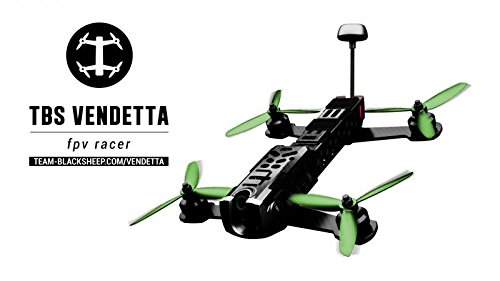
Now, there is just “something” about the TBS Vendetta’s design that brings back memories of the good old all-weather army jeep that could track any terrain. And of course Vendetta is really the jeep of the air! I thought it cool to chip in this great racing drone for the sake of all my fellow drone hobbyists.
Priced at $500, the little racing TBS Vendetta is one of the rarely designed FPV-enables drones for racing. Definitely, it does not have a very good camera for FPV like the DJI Phantom drones reviewed above. However, its speed can shoot up to 70mps (please tell me which DJI drone gets three-quarter way that speed?). Yet at that killing speed, the TBS Vendetta retains a very strong connection to its controller and it can perform acrobatics within the air like the swings, rotations, sudden halts, among many others in a manner that rivals no other drone. Maybe before, I could add my personal opinions, let’s have a look at how the small TBS Vendetta performs.
Features and Specifications
- Camera: Comes with either GoPro Hero 3/4
- Video resolution: relative to the included camera. Supports HD streaming
- Battery time: between 4 and 6 minutes (depends on the battery you order alongside the drone).
- Controller: app controller with FPV goggles.
- Maximum Speed: about 50mph.
- Control Range: about 200 meters.
- Cost: roughly $500 – $550.
Pros:
- Durable: one of the key elements that make this bot so attractive is its durability. Well, let’s just face it. Most races love drones that could survive crashes and even in crashes they could be recovered with ease. Now, Vendetta is made of strong fibre that will hardly crash. However, even if the worst happens and it crashes/breaks, it is very easy to amend its propellers and set it back to airwaves.
- FPV enabled: perhaps you too will admit that not many racing drones have this feature. And even the few that have it, they cannot perform a third of what TBS Vendetta does.
- Very agile: I know the 45mph by DJI was quite a high speed; but boy, 70mph is just something else. So far, Vendetta is obviously the topmost racer in our list.
- Light weight: this drone weighs about 400g. It is very light to carry and you may be tempted to catty it to office or to the woods when you go hiking.
Cons:
- Short flight time: I don’t know about you, but I find 6 minutes of flight time to be just too short (in my opinion), isn’t it?
- Quite costly: I know the $500 price tag looks pretty normal for a drone. But what you are never told out there is that you will need to purchase this drone’s controller, battery, FPV goggles and the charger separately. I don’t know what you make of that list, but I think, it’s quite a long one to add on top of a $500 price tag.
- Hard to learn: Vendetta is not a good teacher. If you need to learn, please don’t do it at 70mph with a drone that lacks GPS and a stabilization mechanism (like TBS Vendetta), it will certainly disappoint you.
Conclusion
TBS vendetta is certainly a great drone for either racing or in house flights. It is very responsive to its controller, very much durable and certainly cheaper to acquire. However, this drone could best be used by hobbyists. No professional would cherish changing/recharging a battery after 6 minutes. However, besides that one main drawback, this bot is generally awesome to try out.
Getting Started With Drones: Best Budget for Beginners
Disclosure: As an Amazon Associate, Unwrittens earns from qualifying purchases. This never changes what we recommend.
The drone world is very exciting, albeit a sneaky one too. So, after going through our post on the factors and features to consider before buying your first drone you may have wondered of the best budget you could possibly begin with as a beginner. Or even, you may have wondered which one among all the best drones out there you ought to give a try. Well, in this edition we ventured to explore a few critical cost related issues that you may need to consider before buying a drone. In addition, we will also suggest to you some drone options that we feel will be the very nice ones to begin with. So, let’s begin answering some of those popular questions that are likely to bother you up.
Q1. So, what is the best budget to begin with when buying drones?
The answer to this question is relative to one’s financial ability. If you can manage the top drone brands, then it could far better to begin with them rather than the cheaper alternatives (drawing from personal experience). If you are a complete newbie to the world of drones who has been checking out online advices, there is no doubt most people will recommend that you begin learning with cheap priced drones (below $50). The argument in support of this popular notion is quite simple, “…if it is very cheap and it breaks down”, they claim, “I will have nothing much to lose anyway.” This is in fact is not just a claim but it has become a “prophecy” which most of the beginners prophesy on their purchases and actually fulfill it themselves perfectly. They buy very cheap drones and their cheap drones get spoilt equally cheaply and they order other new cheap drones, and the cycle continues.
The argument is very logical and sounds benign. However, there is a regular flaw with this type of reasoning is that many people overlook the aspect of durability of cheap drones. Besides, most of them are very poor teachers as they are not stable, they lose connection regularly and they don’t even balance on air. Thus, one gets to spend a lot of “cheap money” which in the long run costs a lot of finances and a lot of time, yet gains nearly no experience in flying drones. Thus, it is very recommendable that you check the best brands if you can.
But if you can’t, I won’t like to repeat all that we had recommended in the considerations before buying a drone, but first, you may need to consider the guarantee of returning it in case it arrives when it is already broken or if the drone itself actually has a warranty. Most drones of this type basically start at about $50. There are of course some other exceptionally great drones like the little Syma X5C (currently costs about $44), the Hubsan X4 (currently rated at $34), the Proto X (priced at $30) and many others. Remember only thing you will need to consider carefully before buying a drone costing below $50 is simply the golden factors addressed before. Actually, the best beginning price should actually be at around $200 dollars with some quadcopter like the Parrot AR Drone 2. But if you can still afford the LatRax Alias at $95, boy, don’t hesitate to make an order. It’s certainly better than a kick in the pants.
Q2. What other cost should you consider beyond the buying price?
Drone accessories: besides the price tag, one other important cost to consider carefully is the cost of the drone’s accessories. For instance, if a drone costs about $55, had a separate controller that goes for $21, has a separate battery that goes for $11 and a camera as well as FPV goggles for $20, it could typically make sense if you opted to purchase a drone that has all the complete set that goes for $100. This is simply because some of these drones that are Bind-And-Fly sometimes have an issue of incompatibility with vendor cameras. Now, think about, how glad will you be to have a brand new GoPro Hero 4 camera or the brand new Flir duo camera (with night vision) yet it becomes incompatible with your drone? Of what use will it be then? In the light of this consideration, I often advice newbies to opt for Ready-To-Fly drones rather than BNF drones.
Cost of replacement parts: well, you all know that drones are not everlasting gadgets. Now, how if you paused before making a purchase of a cheap and cutely looking drone and asked yourself, “how much will those propellers cost me when I need a replacement?” If you find out that the drone’s replacement parts are easily available and are cheap, well then you can comfortably make an order.
Q3. And what are the most recommendable cheap alternatives for a beginner?
As highlighted before, the best drones for a beginner should basically be our top drones as reviewed before. But let’s say you are working on a pretty tight budget, in that case you may opt to check out the following 5:
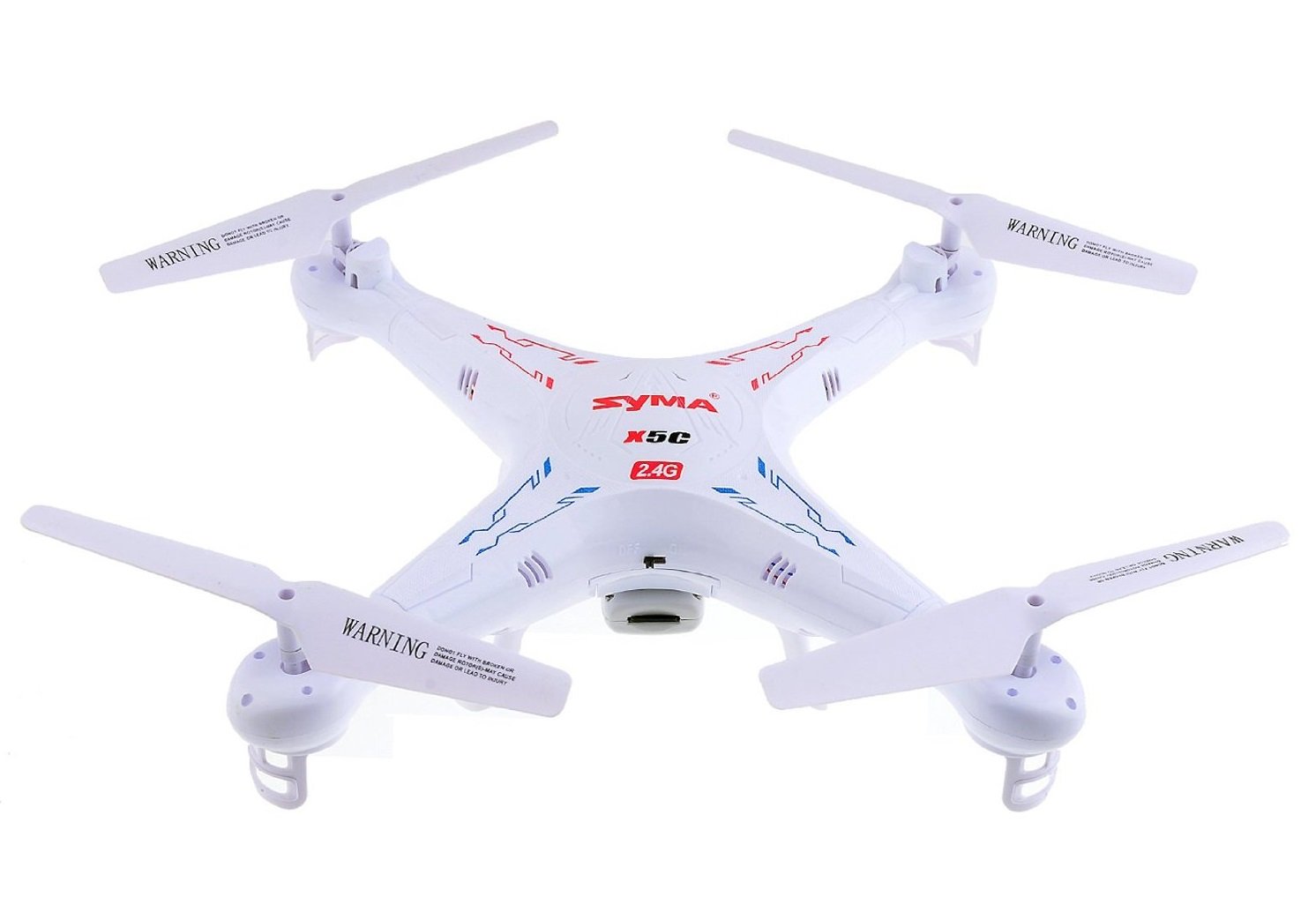
The Syma X5C drone is the world’s top selling drone currently. Basically, it’s just a toy, nothing very special. Just that it is cheap, has a better design, has 6-axis gyro stabilization and it is able to perform awesome acrobatics. This drone currently costs about $44.
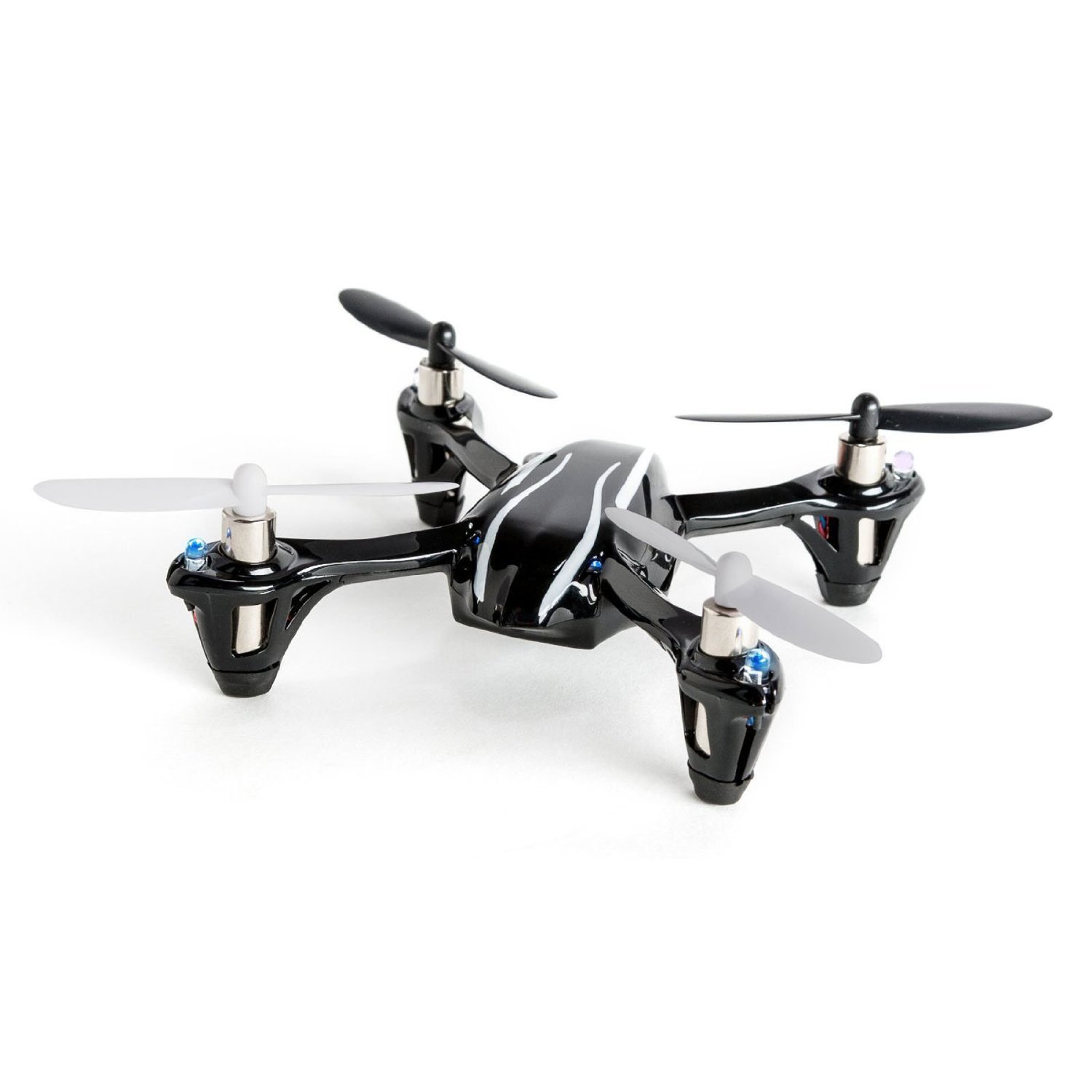
The Hubsan X4 is definitely one drone worth recommending for a newbie to flying drones. It has quite a longer control distance, has a longer flight time and somehow, it has a special stabilization feature that works much like the 6-axis gyro stabilization feature. Generally, it is much above the bar for an ordinary toy and it costs just $59 currently.
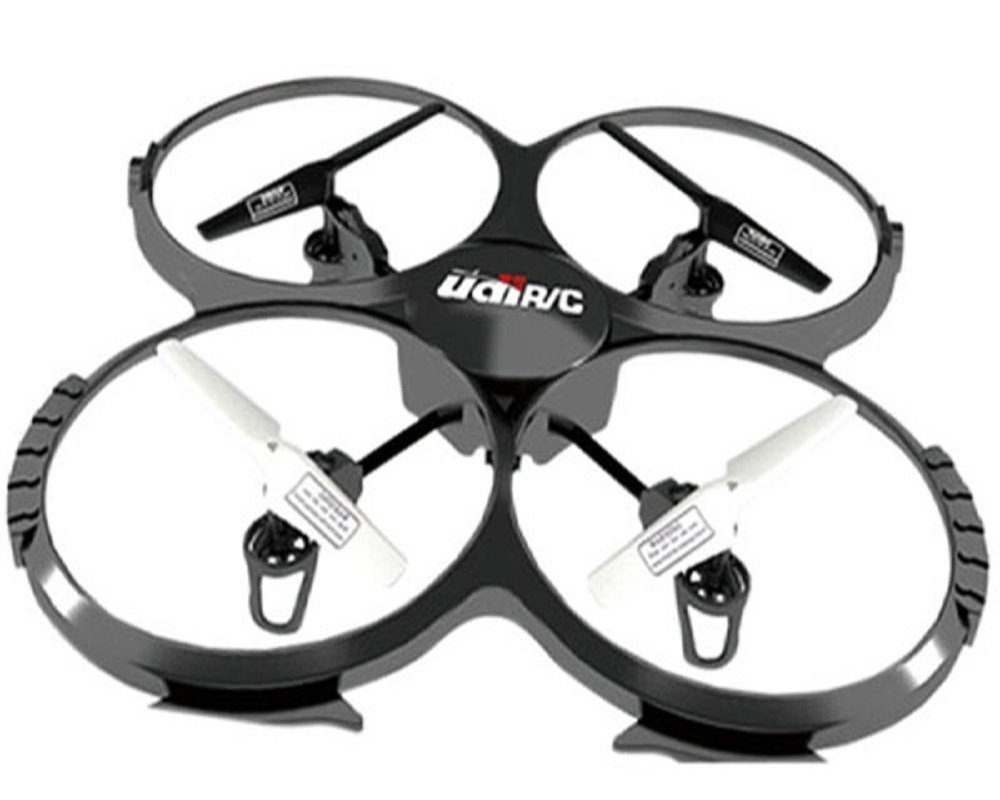
One thing that is very attractive to UDI 818A drone is its cool design. Besides, it has cool prop guards that prevent it despite several crashes. It also has an awesome camera for a drone that is priced under $50. Even so, this drone does not cope very well with wind and it somehow keep on losing its connection.
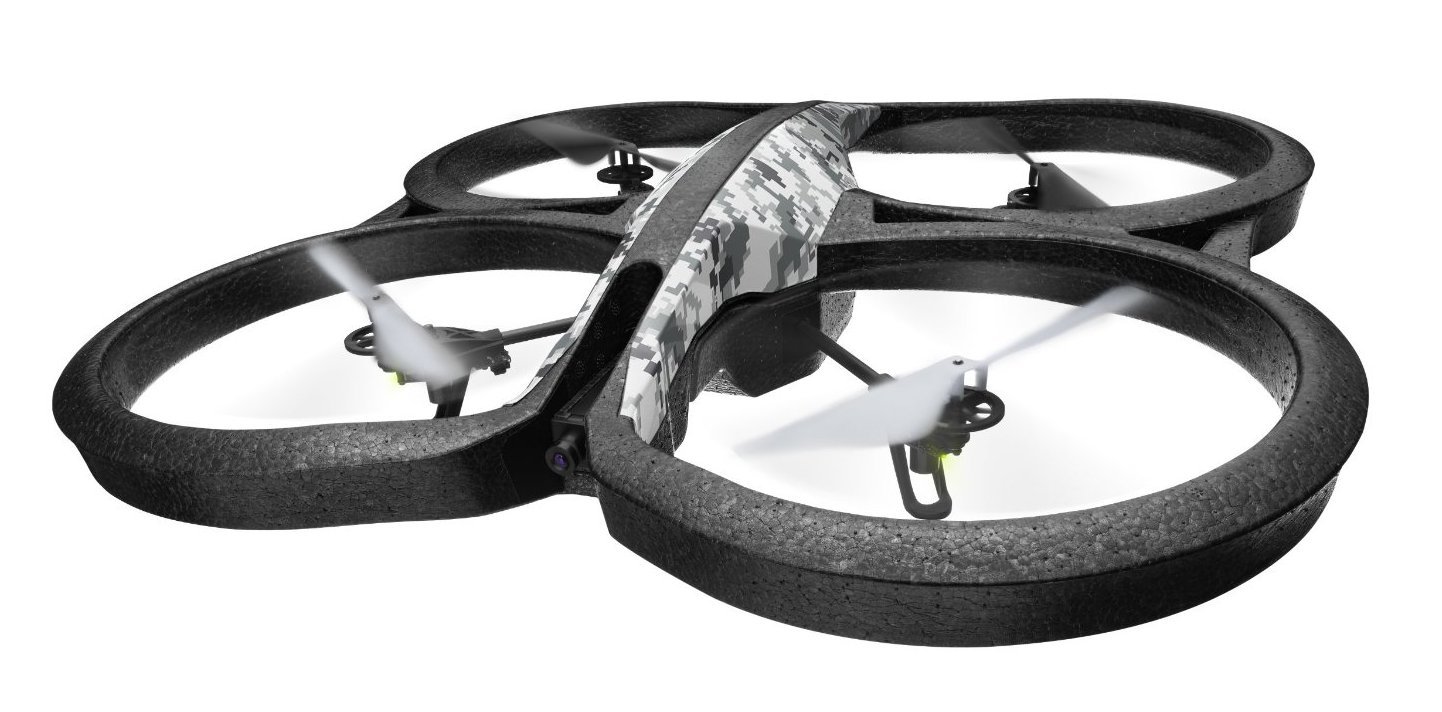
Parrot AR Drone 2.0 is the ultimate beginner drone. It costs just about $300 but it is worth the huge cut. It has 2 cameras, has two coverings and can be used both indoors and outdoors. It is very agile, stable and generally easy to fly. Besides, it is controlled by a phone application and allows for FPV. It is not the best drone out there, but it is certainly a good teacher and it has great features that will make one easily enjoy his/her first flight experience.
Drone buying guide: Factors and features to consider when buying a drone
What do you think it costs to find a cheaper, better and more durable drone nowadays? …Money? Absolutely not! You can spend $2000 to buy exactly what you could have bought with $500 only if you had paid some attention. With several online traders selling drones nowadays, buying a really great drone does not just cost money anymore; it also costs some time and some careful attention to seemingly simple but ultimately important factors. In the olden days, when buying drones, you only got what you paid (financially) for. That has not really changed, it is just that nowadays you have to pay more attention than money in order to get the best drone offer among the many that are blasted all over the internet. In this awesome edition, we compiled some 6 Essential Factors to Consider before purchasing any new drone from the market. As you will notice, the cost of a drone is the sixth factor in importance when buying nowadays. So, what is it that you must keep in mind?
Factor 1: Seller & Drone’s Authenticity
If you have been keen on drone sellers, then you may have noted that trust has become a very rare commodity nowadays in the market. Trustworthy sellers have it all in their sales and you will get to see this from their online reviews and most importantly in their after-sales services as well as other minor things like a warranty for their drone sales. Now, this is not to imply that new sellers, who don’t have reviews, should not sell their product. In fact, even the established sellers at times get issues with trust. The point here is that the seller should provide anything that can guarantee the authenticity of a product e.g. giving it some warranty or offering to replace in case the product malfunctions at its arrival. Such an assurance of security is surely an assurance of quality.
So, the next time you intend to buy a durable drone, look out for such assurances. Use this post as your checklist and look for the above assurance. It will hardly be provided by sellers of substandard drones. So, if a seller will lack this, close that page and check out a different seller. If a seller has not done enough to earn trust, then such a seller should honestly not earn your hard-earned coin, (or) should he/she? Search and search, my dear buyer, search for this assurance: This is the first coin you pay for a durable drone.
Factor 2: Drone’s body material quality = drone’s durability
Often, a drone’s material quality equals a drone’s durability. Well, to someone who has never bought a drone before, this may not sound as important as we are trying to make it look. But think of how “happy” you will be if you accidentally crashed your $700 drone on the ground (something that happens often) and it stopped working completely? Won’t you feel like you should never buy another drone ever? Yet, with the addictiveness of flying, you will slowly get tempted to purchase another one and the problem repeats again!
So, the quality of a drone’s body material is something worth considering. Usually, cheap-priced drones have a body casing of ordinary plastic or strong plastic. These types of drones are usually very catchy by looks but they often spoil after very few crashes. The best options are carbon fiber and glass fiber options that are all so durable and much better in performance. In recent times, there have been aluminum casings options as well that are durable too. The only bone you too may find with Aluminum is that it is sometimes too shiny, hard to clean and at its worst, it does not support good cooling of the internal parts of a drone. So, aluminum is not very much recommendable; but if it’s all you can afford, well, in that case, it is just better than a kick in the pants.
Also, consider carefully the composition of the propellers and the landing gear as these two are the most notorious parts to break in a normal drone.
Factor 3: Ease of replacement parts acquisition
This is a factor that most new buyers do neglect at their first buy, but it obviously haunts them when their drones break down. While the little bot is all well and buzzing in the air, you are not likely to have a thought it breaking any time during that flight. But it all happens that the drone’s propeller breaks or the battery malfunctions, or the internal motor just jams, or … (name your favorite accident) happens when at the epitome fun of the flight. And only at this time do you usually wish there was some way to get a spare part or a quick fix then you could continue flying.
Luckily, most of the popular drones have their spare parts easily available on sale and you don't have to buy a whole new drone just because its landing gear no longer works. So, before buying a drone, also make a point to the search if there could be an available vendor of the drone's spare parts. If there is none, kindly consider not buying the drone (no matter how good it looks). Drones don't last forever.
Factor 4: Could you do BNF (Bind-and-Fly) or RTF (Ready-to-Fly)?
Not all drones come when they are very ready to fly (RTF). Some drones may require you to get your hands a little dirty before you can set them on the airwaves. That is, they come as parts and your job becomes that of welding them before they can take a flight, thus the term (Bind and Fly). One good example of a popular BNF in the market is the Walkera QR X350. Whereas reason and common logic could dictate that learners opt for the RTF drones; cost, performance, and experience will tend to make one love the BNF drones. But that is beside the point; preferences change with personal experiences too and it's not wise to argue that now.
The point, however, is that, if you have got a phobia of the screwdriver, always consider buying RTF drones than BNF drones.
Factor 5: Ease of use
There is a popular argument that cheaper drones should be reserved for learners and the expensive ones for professionals. However, the contrary could actually be true. This owes mainly to the ease of using a drone. Well, let's face it, if you have never flown drone before and you come across a drone with a manual box controller with gears and blank scary labeled buttons how likely are you to enjoy that flight as opposed to using an app on your smartphone with an elevated view from the plane? Then again, if you are a professional or a drone fanatic, you may not feel too much of a pinch when using manual controllers. The gears could be just fine.
The best drones in this category have an FPV (First-Person-View) ability (through a phone app or a controller) that allows you to view the world like your drone views it from the roof. Besides, they are often smart enough to tell you when they have wandered too far away from the control distance and should be able to be controlled even via GPS. The worst drones in this classification are those that assume manual controllers and they are usually hard to learn and fly.
But, if you have to learn to use both controllers (for whatever reasons whatsoever), it could be very recommendable that you opt to learn the manual controllers before advancing to the easy-to-use app controlled drones.
Factor 6: Cost
Cost is also a very important aspect to consider when buying drones. Usually, a higher cost could be an assurance of quality and performance. However, this is not always guaranteed, all the above-discussed factors should carefully be considered before you can purchase a drone. There you go now. Don’t gamble with your coin; be sure before you make a trade.
Factor 7: Camera
Nothing is more enchanting than a jolly good “selfie” taken from the skies. Close to 8 in every 10 people who purchase drones will often consider carefully the Camera quality and the clarity of images which is often defined by the camera resolution. Higher the camera resolution normally assures higher chances of taking nice images.
Here too, you may need to consider if the drone actually comes with an inbuilt camera or if it does accept vendor cameras like the awesome GoPro Cameras. If the inbuilt camera is well off, take it; otherwise, you can get a BNF drone and you buy it a nice vendor camera to accompany it.
Lastly, drone videos do appear shaky and they aren't often nice to look at. However, if you get a drone with a nice Gimbal feature, this could help you off to shoot professional videos.
Now, if you are just a fanatic, you may not need to know all this stuff about cameras, but what about the flight time for having fun?
Factor 8: Battery
A good battery is a guarantee of a longer flight time. Usually, cheaper priced drones (toys) do give you a flight time of between 6 and 10 minutes while the advanced drones do give you a flight time of between 30 and 1 hour. Sadly, you may have noted that the drone often takes a time span that is much lower than the rated time. This is because manufacturers test their drones in ideal environments with no abnormal air resistance, no heavy loads on the drones, and generally not much obstruction to the drone’s flight. However, in an ideal environment, they could even last half of the stated flight time. Thus, it is highly recommended that if you would like to fly longer consider the following important points:
i.Buy two or more batteries.
ii.Buy drones that take a shorter charging time and longer flight time.
iii.Buy drones whose replacement batteries and chargers are easy to acquire.
Factor 9: Control range
Before you buy a drone, please consider carefully the range of which you will be able to effectively control a drone as well as the wireless medium of signal transmission. Often, cheap drones that are controlled by Bluetooth are designed for in-house flights. If you take such a drone out in the field, it may wander off onto the trees and lose its connections. This in essence could imply that you may have just thrown away your bot.
On the other hand, there are some drones that are controlled by Bluetooth and Wi-Fi that are really strong in the airwaves, have a longer control distance and above all, they hardly shake off their connection. Of course, they do cost a fortune, but it's worth it since you will not easily lose them or damage them. Advanced drones care able to have a limitless control distance and can be controlled via GPS, however, such bots usually range between $1500 -$2500, if you can afford one such drone, boy, go get it! It’s worth the cut.
Factor 10: Design
Everything could be cool so far, but the design is definitely something worth checking out too. Well, we all love good performing drones being in the air; but we also love some pomp in the air too, don’t we? Besides, a good design could also imply lesser air resistance when navigating and even a reduced chance of breaking in case of accidents. I mean, just consider how long a drone lasts once it has its propeller guards intact. Besides, good designing also enables one to easily do simple repairs on the drone if it gets damaged or even makes it cool faster too.
To know how much a drone’s design affects its performance, just check out some reviews (usually from the critics) and see if they complain about the design of a drone. If all is cool, don’t hesitate to buy the drone.
Factor 11: Drone controller
The drone controller has much to do with the ease of controlling a drone (as discussed above). If you are a newbie, it is recommended that you buy drones that are app-controlled rather than those controlled by manual controllers. However, if you are okay with the good old control gears, feel free to choose any drone you would prefer, nothing can get any worse.
Hey! Remember this is very, very, important
Drones and UFOs have not been accepted for filming in many places/countries. And in other places, they are absolutely forbidden. This is not without cause; no one acts normal once he/she spots some buzzing camera closing in near him/her. This is because everybody else (apart from you) will think their confidentiality is being infringed. Thus, you may sometimes get yourself taking a flight behind bars if you don’t fly legally.
Top Cable Modems
Disclosure: As an Amazon Associate, Unwrittens earns from qualifying purchases. This never changes what we recommend.
It’s better to buy your own modem than it is to rent since you can pay off in a span of 5 to six months when compared to renting one from Comcast or any other service provider which may cost up to 120$ per year. Each year that you decide that you will pay for a rental modem monthly it cost you dearly.
Most companies like Comcast and Time Warner Cable charge their customers extra if they supply them with cable modem on top of the internet connection monthly. Some companies like charter usually bakes the price for cable modem into the internet connection monthly. The fees might go up in the near future so why not just buy your own modem which will help you save more than $100 yearly even if you will have to take care of your own upgrade (be your own tech).
Consideration Factors
With a plethora of different makes and models of cable modems out there, finding the best cable modem for your unique needs can be pretty overwhelming. However, by knowing the different factors to take into consideration when shopping for a cable modem can help you make an informed decision. To kick start, you need to familiarize yourself of the different components that make up a cable modem. These components include the tuner, demodulator, modulator, microprocessor, CMTS, and MAC.
Apart from knowing the various components, you should also consider its design and performance, compatibility, ease of use, security features included and finally its warranty.
You should confirm with your ISP that the modem you want to buy will work with the kind of service that you may be paying for. Mark that, this does not mean that if a certain type of modem is not compatible with your ISP it will not work with any other.
Design is also a factor that should be critically considered especially when it comes to the indicator lights which show you whether you have internet connectivity, whether you are connected to the computer and also telling you the status of your send and receive channels. When it comes to price and warranty it is vital to consider one which has a cost that is low enough to pay for itself in less than a year, if you are planning to save rental fees this because most modem maker companies give a one-year warranty.
With that in mind, here are our top 5 cable modems that you can confidently choose from and get the best bang for your buck!
NETGEAR Nighthawk AC1900 (C7000) (With built-in wi-fi router)
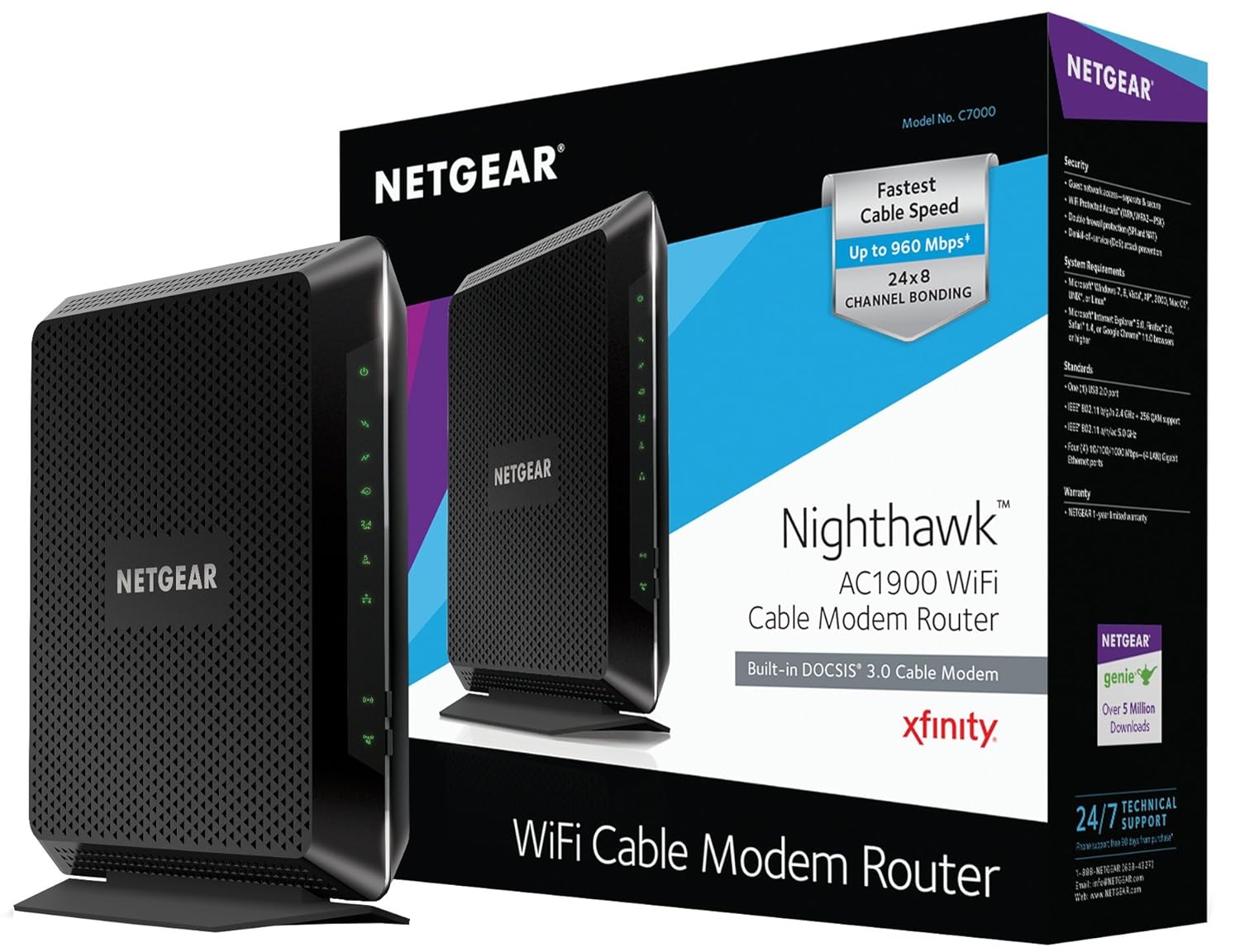
The NETGEAR Nighthawk AC1900 (C7000) is one of my favorite cable modems. It is priced around $200. A little expensive but is absolutely worth it considering it’s capabilities.
If you are interested in the fastest Internet plan and you want a type of cable modem that is able to work the way you want with the HD video streams and the high speed online gaming that you usually do, the NETGEAR Nighthawk AC1900 is the perfect fit.
When it comes to speed it cannot be compared to any other. It offers up to 960 Mbps and can also handle dual-band AC1900 (2.4GHz and 5 GHz) Wi-Fi speeds with a channel bonding of 24 by 8. If you are also interested in fast speed or broadcast via Wi-Fi, you can plug in directly using the available Wi-Fi router that comes with four gigabit Ethernet port and one USB 2.0 port. You can also broadcast Wi-Fi widely if you have a large place of living. You will not have to suffer due to less connection or anything.
For those with highest internet tier from Cox, Xfinity/ Comcast and many other providers we would recommend the NETGEAR Nighthawk AC1900 (C7000). It however does not support bundled voice but comes with the Option NETGEAR Nighthawk AC1900 (24×8) DOCSIS 3.0 Wi-Fi Cable Modem Router (C7000) Certified only for Xfinity from Comcast.
With a 1.6 GHx Processor, this router can manage heavy tasks effectively; Since it can quickly process data and convey it across to the various devices connected for HD video Streaming, 4k Gaming and more.
It also has 24 x 8 channels that can give you significant download speeds to over 900Mbps. If you’re experiencing low speeds, you can use this modem router to make the most of your internet connection and enjoy maximum speeds.
Using the NETGEAR genie app, you can easily access your network settings from a supported device such as laptops, PC’s and smartphones. This allows you to monitor your network and control the sites connected users visit. In addition, the VPN service provides more security for your network.
The NETGEAR Nighthawk AC1900 includes powerful amplifiers as well as external antennas that generate strong signals for a wider coverage. The unit comes with USB 2.0 and 3.0 ports for easy connection to external devices. It’s also designed with 4 LAN ports.
It’s compatible with nearly all the major cable providers and mainstream ISPs. Companies such as Cox Premier & Ultimate and Comcast recommend using this modem if you want to experience improved speed from their services.
The NETGEAR Nighthawk’s capacity to deliver great efficiency makes it one of the most recommended modem/router today; it uses the DOCSIS 3.0 technology and provides a reliable connection and amazing speeds.
Pros:
- Super easy setup
- USB 3.0 port
- Lots of security options
- REALLY fast local area network
- VPN (virtual private network)
- Good ventilation (it runs hot, stays cooled off)
- Traffic metering with time limit and volume controls
Cons:
- Expensive
- Larger footprint than most routers
- Good connectivity range, but nothing exceptional
ARRIS Surfboard SB6190 DOCSIS 3.0 Cable Modem
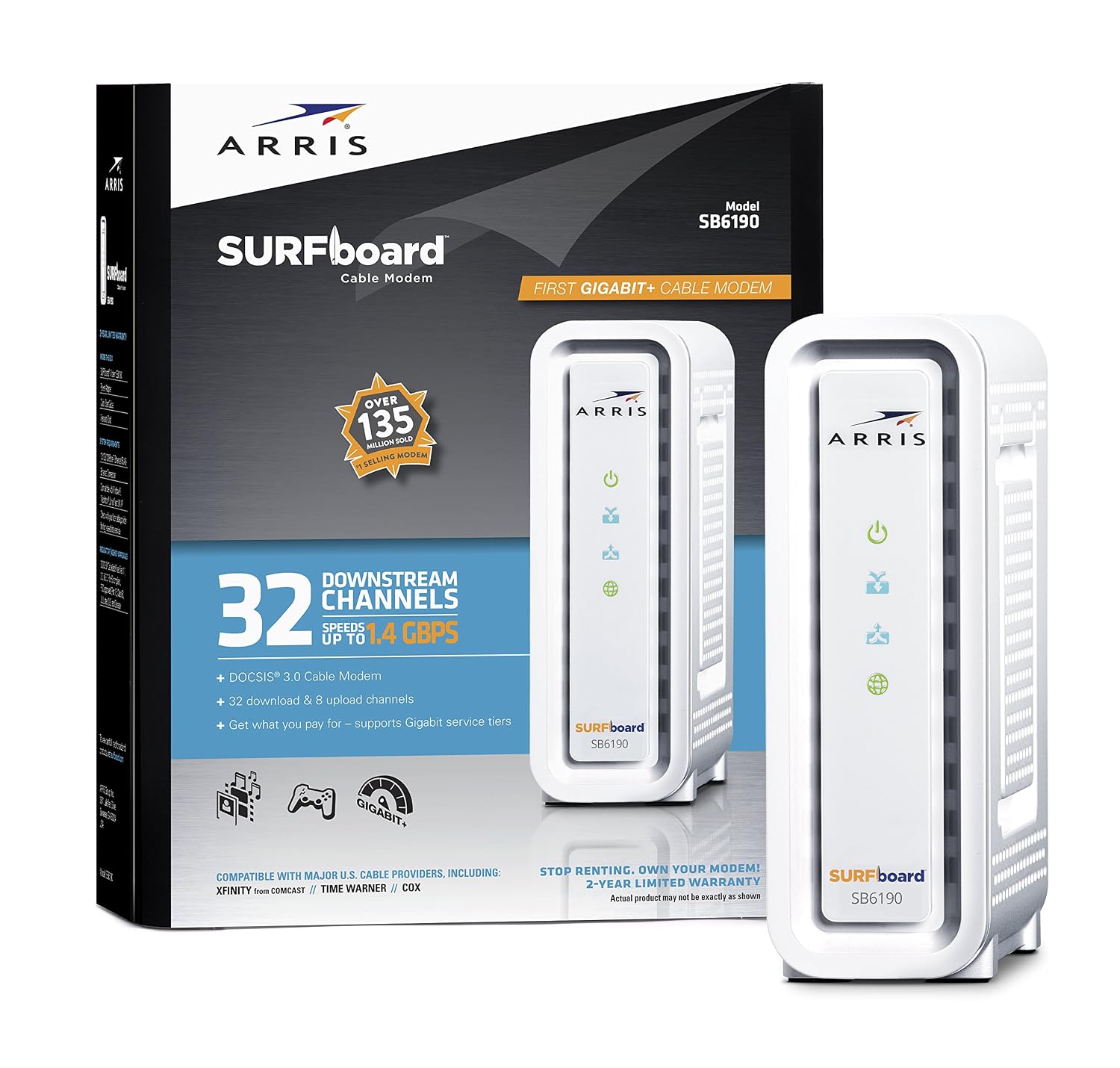
My top choice as of now. The ARRIS SB6190 has received an excellence award for feature set, speed and design. It is compatible with top cable internet providers in America, which gives you great convenience if you happen to change internet provider in the future. Some of the providers include Cox, Charter, and Time Warner Networks.
It also comes ready for high speed internet with a maximum download speed of 1.4 Gbps and upload speeds of 262 Mbps. It comes with 32 download channels and 8 upload channels therefore speed is now better than ever before.
The ARRIS SB6190 features DOCSIS 3.0 technology and supports both IPV4 and IPV6 internet standards for enhanced performance and security.
It’s designed with a gigabit Ethernet port for easy connectivity with your Mac, Windows, Macintosh or Linux computer. The LED indicators helps to keep you apprised of the connection status.
Pros
- Easy installation process
- High internet speeds
- 2year warranty into one neat and tidy package
- 32 downstream and 8 upstream channels
- Supports latest internet standard of IPv6
- Reaches download speeds of up to 1.4 Gbps
- Compatible with major ISPs
Cons
- Need to get a wireless router
- Requires cable service
- Upfront investment
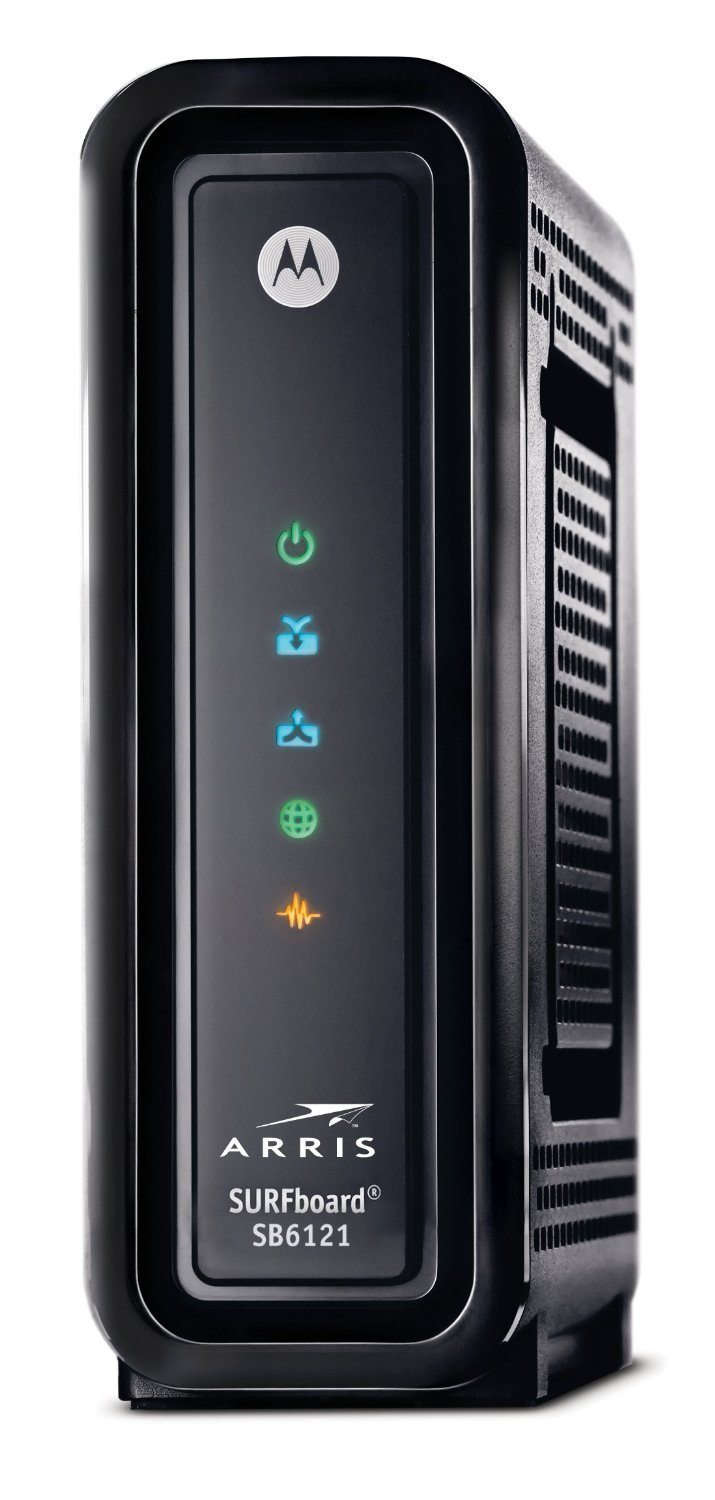
The Arris Motorola SB6121 delivers hard to beat ease of use and download speeds allowing you to enjoy the ultimate gaming and video streaming experience.
The overall compatibility of the Arris Motorola SB6121 is superb this is because it can connect to the 10 largest cable internet providers in the United States. This includes the four largest providers: Comcast, Time Warner Cable, Charter and Cox. This therefore means that if you own this modem, you will benefit in the future if you want to switch ISPs. Owning this modem will not inconvenience you since it will also be compatible to them.
The SB6121 has a maximum theoretical download speed of 172 Mbps and an upload speed of 131 Mbps. However, download speeds can be closer to 100 Mbps than 170Mbps when you are dealing with network overheads. The 100Mbps is not bad but if you are a web person you might need to look another cable modem that will satisfy your high speed needs.
With this modem you get four channels of download and four channels of upload which offers you higher download speeds reaching nearly 172 Mbps in every direction. This makes surfing, online shopping, and downloading faster, more realistic, and efficient for you.
In addition to supporting the faster DOCSIS technology, this modem supports a Gigabit Ethernet connection between the computer and the cable modem. Front panel LED lights indicate status and makes troubleshooting a breeze.
The SB6121 modem comes with enhanced security features such as IPv4 and IPv6 compatible, Advanced Encryption Services, and supports virtually every other DOCSIS 3.0 standard to ensure your network is safe always.
Pros
- ISP compatible with the 10 largest service providers.
- 2year warranty
- Does not run hot fast.
- 24/7 live technical support
Cons
- There isn't a power button, which means you'll need to unplug the modem to power it down.
- 4 by 4 channel bonding.
- No reset button
- No power button.
TP-LINK Archer C7 – AC1750 modem (with built-in wi-fi router)
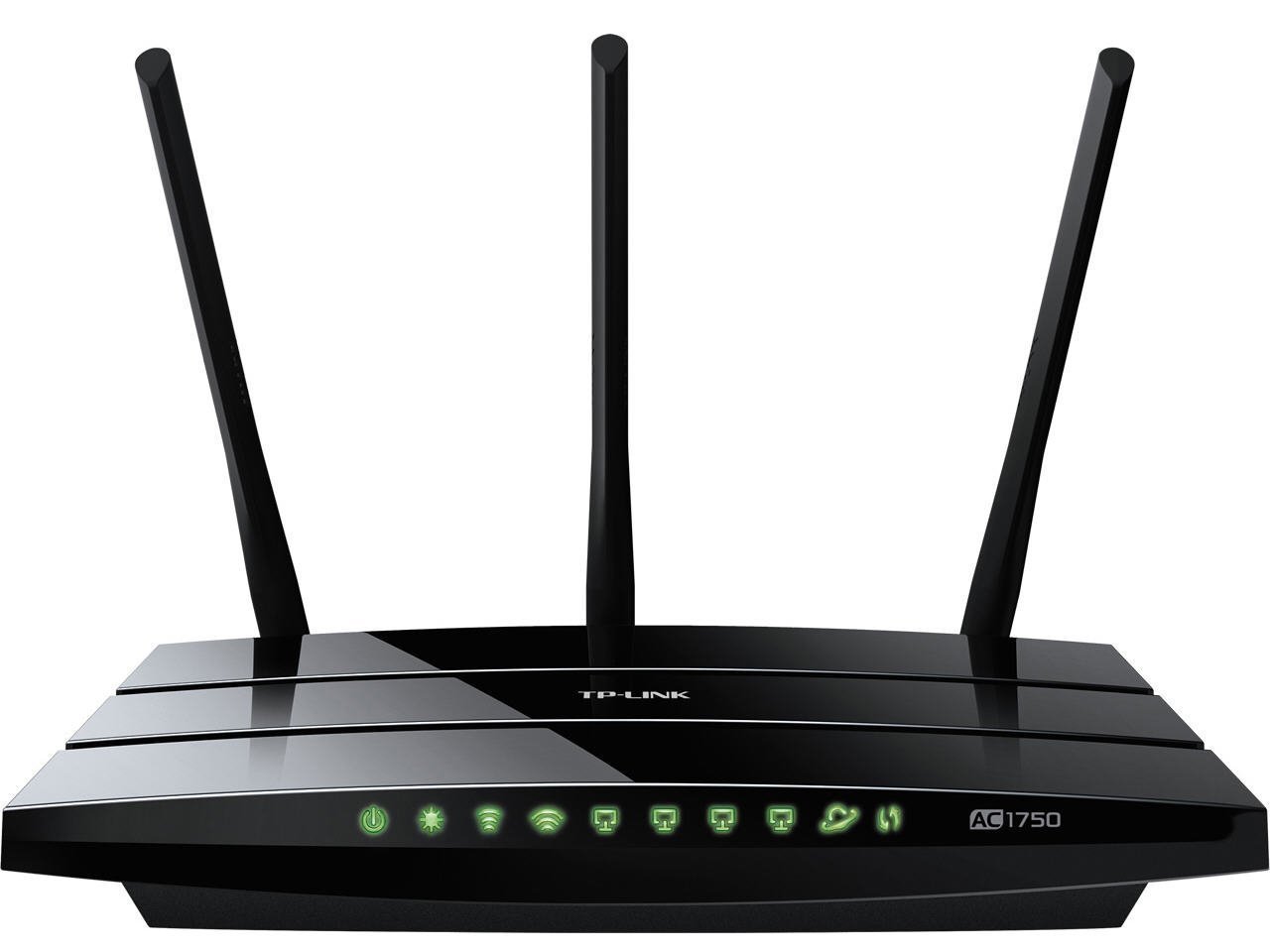
The TP-Link AC1750 is one of the leading contenders when it comes to cable modem router, particularly due to its 16 by 4 Channel bonding, the DOCSIS 3.0 technology and not to mention its affordable price.
With the TP-LINK AC1750 you will not require an additional router since it comes with built in dual band Wi-Fi antenna.
Moreover, it delivers data download speeds over cable of up to 680 Mbps, and up to a solid 1,300 Mbps over a compatible Wi-Fi connection.
It’s compatible with top cable providers in the United States, including XFINITY, Comcast, Cox Communications, Spectrum and more. Moreover, if you experience any compatibility issue, you can easily solve it by visiting their online forum.
Harnessing the 2.4 GHz bandwidth can help you achieve speeds of up to 1750 Mbps. Going up to 5 GHz simply means you are getting a network connectivity of almost 1300 Mbps. For the speeds, this modem can give you a download speed of nearly 450 Mbps, which allows you to seamlessly enjoy online gaming, HD video streaming, and incredibly fast file transfer. As earlier mentioned, this unit utilizes DOCSIS 3.0 technology, and sixteen downstream channels and four upstream, which translates to increased throughput and even greater speeds.
This modem comes equipped with USB ports, which allows you to access any connected USB device either remotely or via your network with the help of FTP tech. This gives you unparalleled convenience when you want to stream media from external hard drives and also be able to share printers throughout your network.
The built in dual band Wi-Fi antenna ensures that you have a strong and reliable signal in your residential area. It further allows you to assist bandwidth to the machines you often use, maintaining your connection even stronger.
This modem is DOCSIS 3.0, offering you latest technology with higher speed. It is incredibly easy to set up. All that is required of you is to configure a setup to activate your Internet service Provider, and have your internet in full-operation within no time. You can consult your internet service providers for assistance with your installation, if you happen to get stuck during set-up.
This is one of the leading and popular Wireless Wi-Fi routers today; as it’s compatible with virtually any type of cable broadband and delivers great download speeds. With exceptional technical specifications and quality hardware, this is the modem to buy when you need an outstanding performer.
Pros
- DOCSIS 3 Modem with Built-in Wi-fi Router
- Comes with a duo of USB ports for easy content-sharing over a home network
- Packs a solid ADSL2+ modem, Gigabit Ethernet Port
- Reasonably fast wireless in form of 802.11ac
- Easy to set up
- It is also good value for money considering it has built-in router
Cons
- Media serving is not good
- Parental controls confusing
- 2.4GHz performance is quite slow
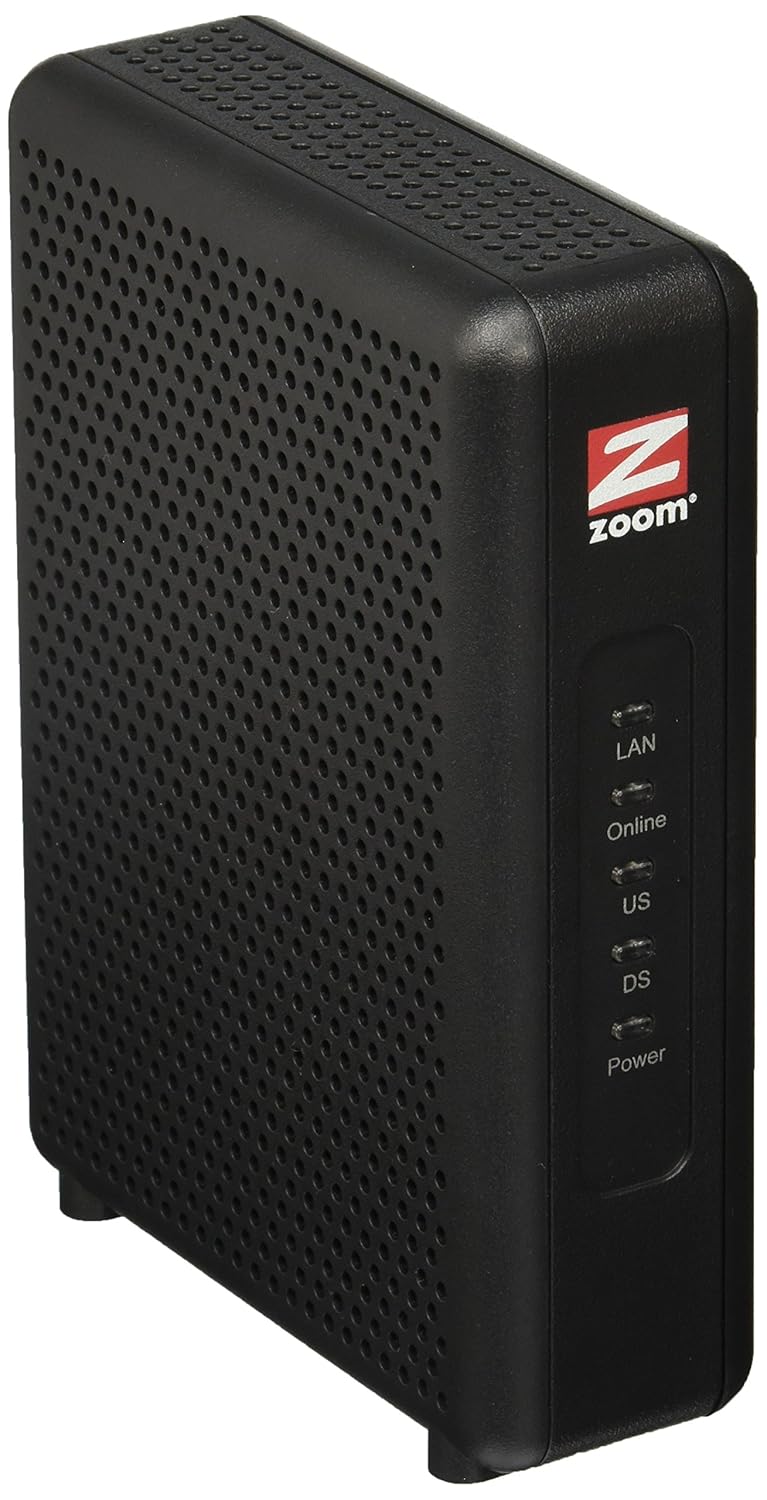
Top on our list is the Zoom 5341J, which is a DOCSIS 3.0 cable modem. It’s well-designed and durable enough to seamlessly operate in both commercial and residential environments.
The Zoom 5341J is compatible with most American cable providers including Comcast, Time Warner Cable or Cox. It can also work with Bright House Networks, RCN and Cable One in addition to those three large ones, without any problem.
Its robust built system as well as a channel bonding of 8 by 4 gives you download speeds of up to 342 Mbps and upload speeds of 131 Mbps. Moreover, it takes 29.8 seconds to be on a fully functional compared to the slowest modem which takes 49.8 seconds.
It has on and off button and also a reset button when you need to troubleshoot when network problems arise. Its exceptional online diagnostic together with the multi-language guide helps you get the most of your cable modem.
With a DOCSIS 3.0 security feature as well as other advanced security measures in place such as Advanced Encryption Services (AES) and SNMP and TFTP enabled for remote configuring and monitoring ensures proper security.
Pros
- DOCSIS 3.0
- Reliable and fast
- This cable modem has an off and off button that can help save money for the electricity bill
- It has a reset button when the need arises to trouble shoot network issues
Cons
- It usually runs hot very fast and thus can easily cause a short life span
Final Verdict
All these cable modems have their own perfections and imperfections. Whether it’s for gaming, watching TV or just surfing the net, you have a variety of options to choose from. Our top 5 list just gives you the best of the best on market in terms of value for money. However, your options are not limited, the most important thing to do is to evaluate your needs and budget so that you are in a better position to select the best modem that will suit your exact needs.
Top 5 Virtual Reality (VR) kits
Disclosure: As an Amazon Associate, Unwrittens earns from qualifying purchases. This never changes what we recommend.
Virtual Reality is a seriously booming industry all over the world. This is because VR has got some “tech-magic” that makes you travel from the real world into a virtual (but looking real) world of a movie, game or just an application. No wonder PS4 has been soaring crazy sales lately. Thinking about it again, it's clear that the recent excitement in VR is not really because the technology is absolutely new; but because its implementation, marketing, and availability have been greatly improved than in the olden days. Yet, when considering the rate at which technology has been evolving in the 21st century, one may sometimes wonder if VR will actually survive 3 years to come or will it just be a transformation phase to a more complicated invention. Of course, there have been quite a formidable counter-argument that AR might slowly phase out VR in the coming years as explored here, but that is beside the point. I mean, technology will always keep changing and if it won’t change, then it is not technology but history.
In this fascinating edition, we sought to explore the market’s finest VR Kits. After a careful and considerate analysis, we drew this list of top 5 VR kits for 2017 that anyone who loves VR ought to try out. But, before I proceed further into the review, I just had to inform every buyer of VR kits that currently, you may only get just as much as you are willing to spend for the VR kits. Sure. VR kits have no bargain as other electronics do. I found out that the higher the performance, the higher the price-tag as well.
So, ladies and gentlemen, it’s possible that there are a lot of promising headsets we’re likely to meet very soon, but before then here are the best (among the best) VR headsets for now. Ready? We begin with…
Rank 5: Got Google Daydream for $78
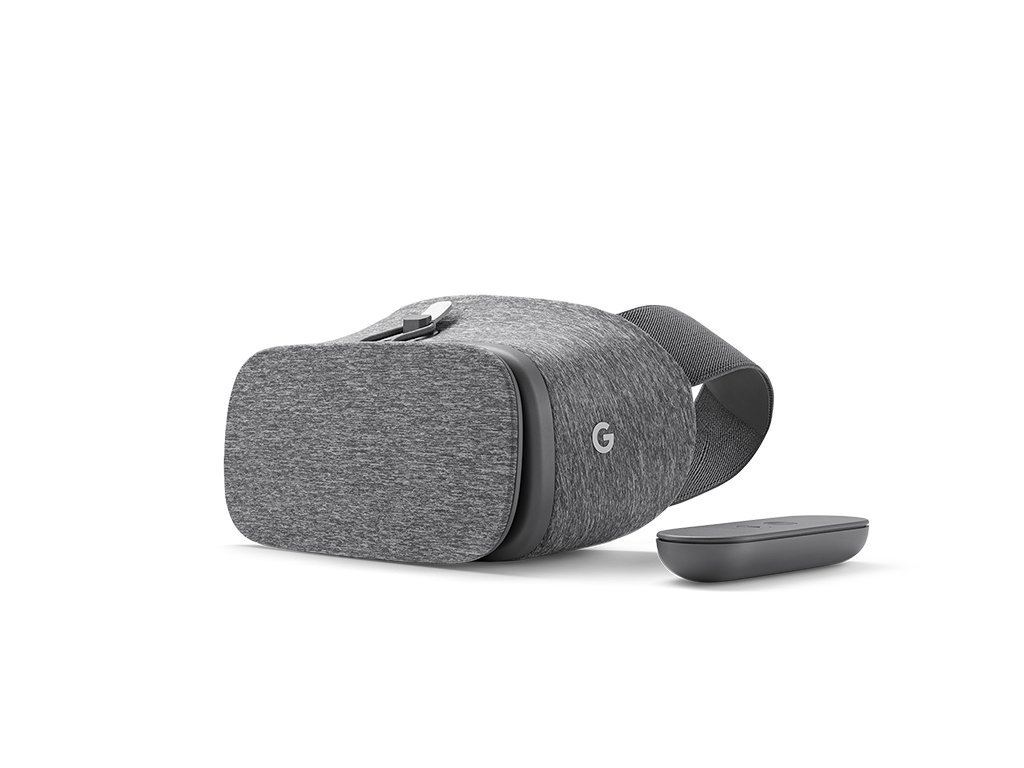
Of all the top 5 reviewed VR headsets currently, Google Daydream was the cheapest headset available in the market. And for any person who used has used the Google Cardboard before, the Google Daydream VR headset will undoubtedly top in his/her list of top gadgets for 2017. This is because unlike the Google Cardboard that was quite unimpressive in design and generally was a sluggish companion in performance, the Daydream is quite a work of art in design and definitely a great performer. It’s so good in performance that even the top phones in the market (including the awesome Google Pixel) don’t seem to cope so well with it.
This headset works by splitting the screen images (much like all VR headsets do) and coupled with a remote control for controlling actions; you actually get to enjoy some of the leisure that so far has been reserved for the expensive brands like Vive.
Features & properties
- Connection type: Mobile connected. I.e. the daydream VR headset is not smart enough to do any processing of its own, but rather offers a pair of lenses that will help you to view images in 3-D.
- Image resolution: is relative to the resolution of the native phone.
- Refresh rates: 60Hz
- Software support: Android version 7.0 (Nougat) or above
- Field of view: not specified but is approximately 100 degrees
- Sensors: Motion sensor
- Cost: $78
- Others: a hand-held remote controller, Google VR hardware support.
Pros
- It is cheaper: this device currently costs just about $78 which is way cheaper than most of the VR kits that can perform even halfway the Google Daydream performance.
- Is comfy and easy to use: one other thing that anybody who had tried this headset will not fail to miss is the fact that the kit is very smooth and cool on the inside, unlike the older Google cardboard.
- Supports a wide range of devices: the Daydream generally has support for many Android devices that are available in the market thus would be more preferable.
Cons
- Limited applications: The Google Daydream VR has an extremely limited amount of applications support. It is even worse to imagine that it does not support even applications that were supported by the Google Cardboard. However, Google is currently working on an SDK update that will solve this limitation soon.
- This thing heats up like crazy: I am not kidding; if you use this device for just a few minutes, you may never have noticed this. But go ahead and try using it for an hour then tell me if you never looked out for a heat sink to cool your eyes and your phone thereafter. This is mainly because current smartphones are somehow limited in handling the bulky Daydream platform.
Verdict
Though it is not the best in the market, Google Daydream is one device that I would recommend to someone looking for great performance but has tightly fixed budget. If you can cope with the heat and the few available applications, then you will certainly have fun “daydreaming”. Get Google Daydream here.
Rank 4: Samsung Gear VR – here’s a great stuff for Samsung gadgets
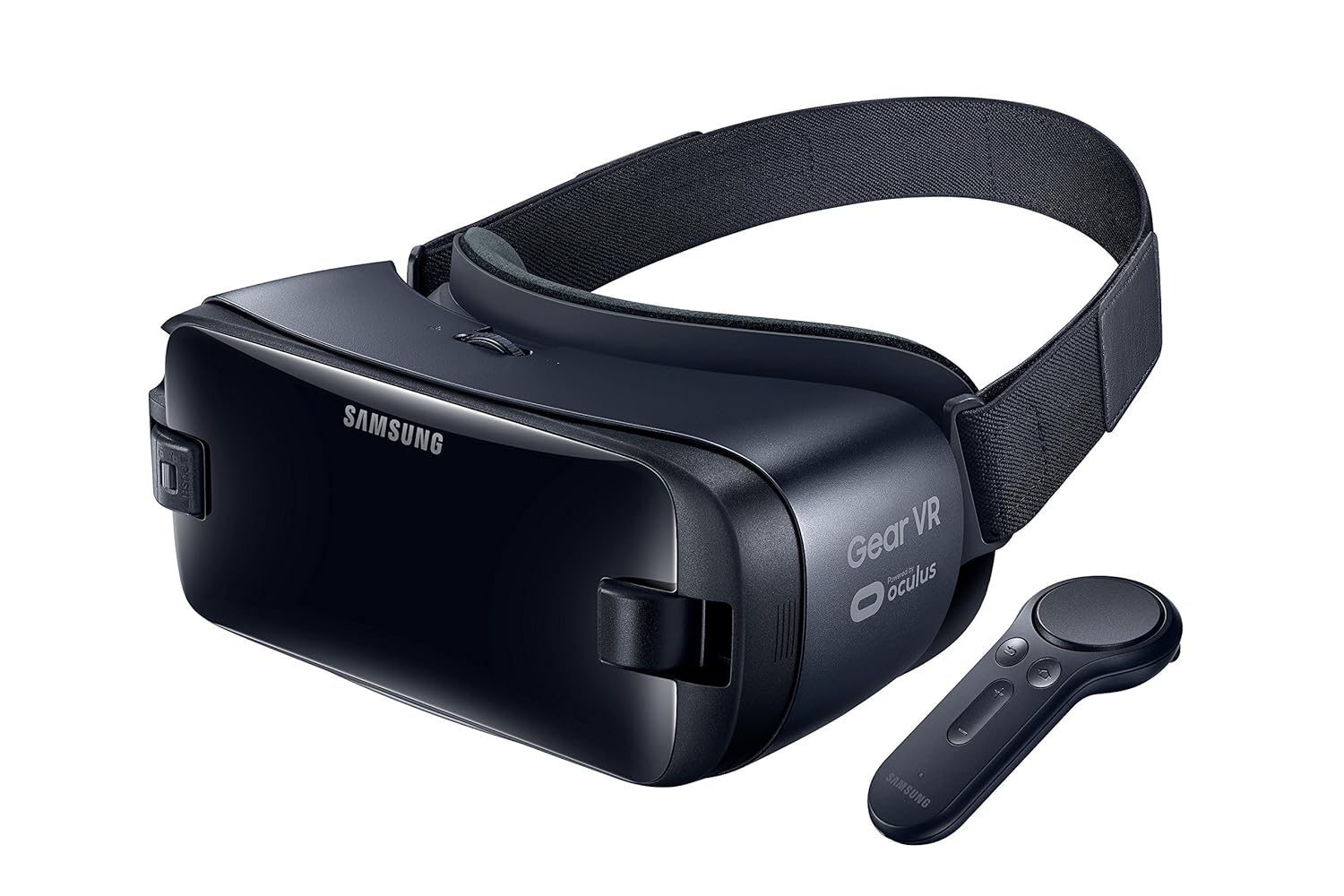
Somehow, I often find Samsung to be such an awesome designer of devices. And when it comes to their VR gear, I find it very much irresistible just by looks. This device was released by Samsung but in essence, it was a production of Samsung and Oculus (thus, you can guess its performance is obviously above the bar). With just $100, this Samsung Gear VR headset is able to transport you daily into a whole new imaginary galaxy where you will be able to view 3D movies, play 3D games and even use phone applications as though they are planted in your sitting room. This device is also chipped with a remote controller and it also supports quite a wide variety of Samsung phones.
Features & Specifications
- Connection type: Mobile connected. I.e. the Samsung Gear headset too offers a pair of lenses that will help you to view imaged in 3-D once you connect your streaming device.
- Image resolution: is relative to the resolution of the native phone.
- Refresh rates: is also relative to the phone used.
- Software support: Android version 6.0 or above
- Hardware support: only Samsung devices (phones)
- Field of view: 101 degrees
- Controller: hand-held remote controller and a touchpad on the headset
- Connectivity: USB 2.0 and USB 3.0
- Sensors: Motion sensor
- Cost: $100
- Others: Samsung Gear VR hardware support powered by Oculus.
Pros
- It’s fun, fun and a lot more fun: this device is able to play both Samsung and Oculus applications which actually means it gives you a very wide variety of applications to select from.
- An awesome design: this headset is really cool to look at. At some point, it may be tempting to even carry it to the office or the cafeteria.
- Relatively cheap: it is not the cheapest kit, but it is really worth the pricing given its nice performance.
- It is comfy: this kit is really cool and comfy to use. Besides, it doesn’t heat up much like most headsets costing less than $100 do. This makes it a very awesome option to opt for.
- Integration of Samsung gear 360 for content creation: this is actually a very advanced feature as it gives you the ability to create customized VR content and nothing could me more interesting.
Cons
Poor image quality: this drawback will differ relative to the type of phone one uses. As noted in the properties section (above), image quality is relative to the phone used. Thus, if you are using this headset for Samsung phones lower than the Samsung Galaxy S* versions, you may soon have to start scratching your eyes if you do not become keen on using this pair of lenses.
A smaller hardware support: that's quite straightforward; if you do not use a Samsung device, then you definitely don't qualify to buy the Samsung Gear VR
Verdict
So far, not much negativity has been related to this device. Thus, I am of the opinion that this headset is actually the ideal option if you have a good Samsung smartphone. You don’t really have to believe it, do you? Just spare some $100 and grab one here then share your experience with us.
Rank 3: The Sony PlayStation VR …Oooh, the good Sci-Fi is here!
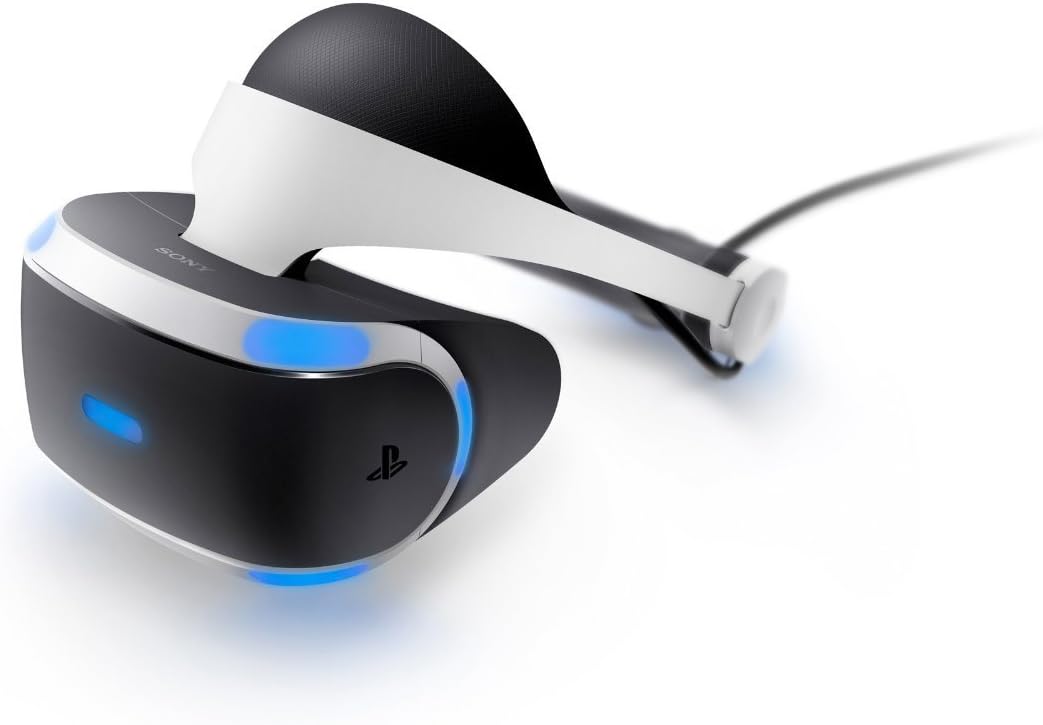
Good heavens! Here is something else that been drawn from Sci-Fi movies. Firstly, I (personally) am a game fanatic and of course a lover of several other games besides the PS. But, there is "something" about this VR headset that makes me not want to compare it with any other headset out there. Sony PlayStation VR brings back memories of the good Holly Wood Sci-Fi movies; though this time round, I happen to be the virtual actor. But before I pour out my opinions, let’s first explore what the Sony PS VR headset will add to your gaming menu.
Specifications & Features
- Connection type: Cable tethering to PC or T.V. set. I.e. unlike the above-reviewed devices, PlayStation VR is connected to a PC or TV via cable and streams graphics to the headset. This implies that this VR has a degree of processing and it is not merely a pair of lenses like the two previously reviewed kits.
- Image resolution: (960 X 1080) pixels per eye.
- Refresh rates: 120Hz (is currently the world’s fastest).
- Software support: PlayStation 4 alone.
- Hardware support: only PlayStation 4.
- Field of view: 100 degrees
- Controller: PlayStation Move and DualShock 4
- Connectivity: USB 2.0 and HDMI
- Sensors: Motion sensor, an external visual positioning sensor
- Cost: $385
Pros
- Great performance: this device is very awesome in relaying images. It is currently the world’s fastest VR gear for relaying images. Besides, this headset has an unmatched quality of images. No wonder, it has hit the highest sales of all the gaming VR headsets in the market.
- A nice user interface and design: I know I have already given a glimpse of this device’s performance, but surely I can’t have enough words to describe the experience of using this VR kit. Perhaps you too should buy/borrow one, use it and share the experience with us.
- Easy to use: This VR headset is perhaps the easiest to use and it is very user-friendly.
- Great software and hardware support: Sony has really backed up adequate support for their VR sets and there is always an answer to your headset problem if you only shared it. This is really worth mentioning.
Cons
Quite expensive: This gadget is currently priced at $385 in Amazon. Though this device is really cool, its price tag has been quite a hindrance to many game fanatics. However, besides the price tag, I have hardly experienced a bone with this headset.
Verdict
For any game fanatic, this tool is the one must-have device for 2017. It is really awesome to give it a try. Though it does look a little expensive, surely it is not so expensive. So, if you can save some few more bucks, you really ought to visit here and give it a try; it never disappoints.
Rank 2: Oculus Rift for $500
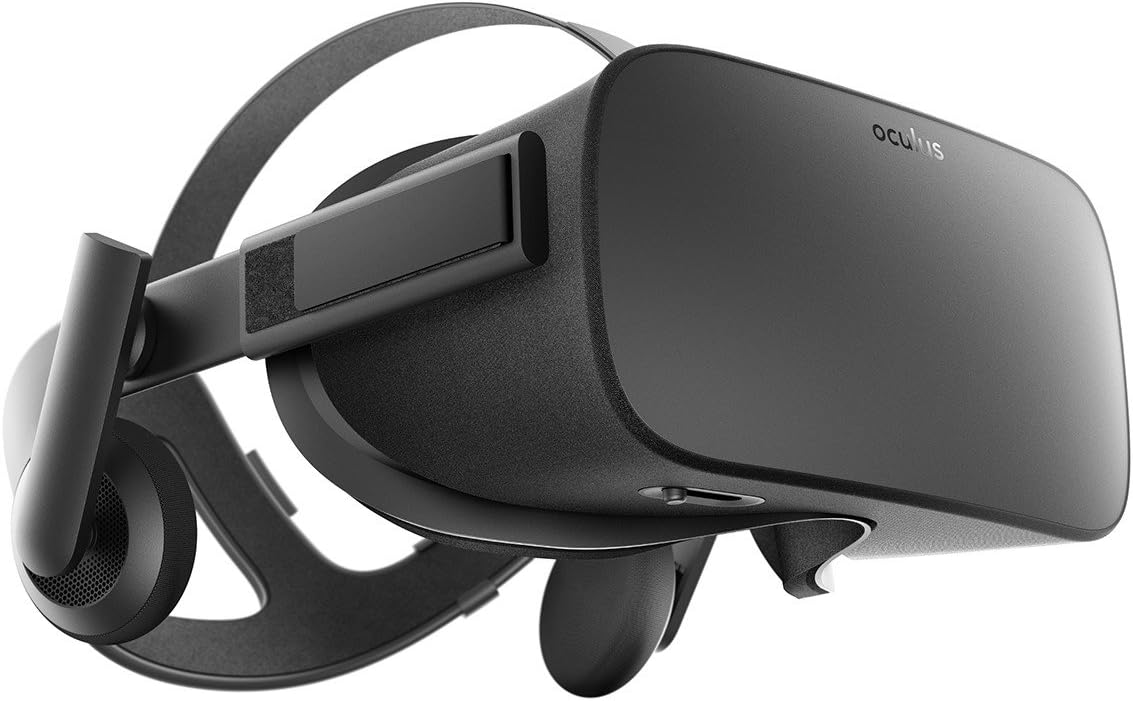
Well, here is the oldest and one of the most enhanced VR headsets available in the market. Unlike the new trends that buy the idea of hardware dependent approach to VR compatibility, the good old Oculus Rift seeks to have a VR headset independent of the hardware. This, of course, comes at a cost. But if you love quality on different gadgets, would you really mind the cost? I hope not so much. Besides, this VR headset has a very wide variety of application-support and it has added accessories like the awesome earpieces and a very health-conscious pair of lenses. Here is how the Oculus Rift performs:
Features & Specifications
- Connection type: wireless tethered.
- Image resolution: (1080 X 1200) pixels per eye.
- Refresh rates: 90Hz.
- Software support: Oculus.
- Hardware support: A PC.
- Field of view: 110 degrees
- Controller: Oculus Touch and Xbox One gamepad
- Connectivity: USB 3.0
- Sensors: Motion sensor, an external visual positioning sensor
- Cost: $500
Pros
- Awesome image resolution: this device has a very good image resolution when compared to almost all VR gears available in the market. This means, its VR is something very close to reality. Besides, if you use it in a PC with really good specs, you may end up being hooked for a day.
- A wide application support: this is the ultimate VR gear as it gives you a very wide variety of applications to choose from. This makes it the king of all VR kits.
- A wide hardware support: as noted earlier, this VR is not tied to any specific hardware company and this makes it ideal for all time gamers or VR fanatics.
- Very light weight: weighing about 1.2 lb.
- Has a good user interface.
Cons
Quite costly: Well, if you thought the PS VR headset was so expensive, then I am certain you will not manage this one either.
Less durability of recent releases: though this gadget has in the past been applauded as one of the most durable VR gears, its late releases have accumulated very bad reviews on durability, something that should make anybody hesitate in making a purchase.
Verdict:
Generally, the Oculus Rift is a great VR gear for both entertainment or even for researchers. It is one of the very best VR gears and the online rating of about 9.4 out of the possible 10 of nearly 700 buyers should be enough to prove it. You can find the Oculus Rift here.
Rank 1: The HTC Vive …is the VR Vibe of the year
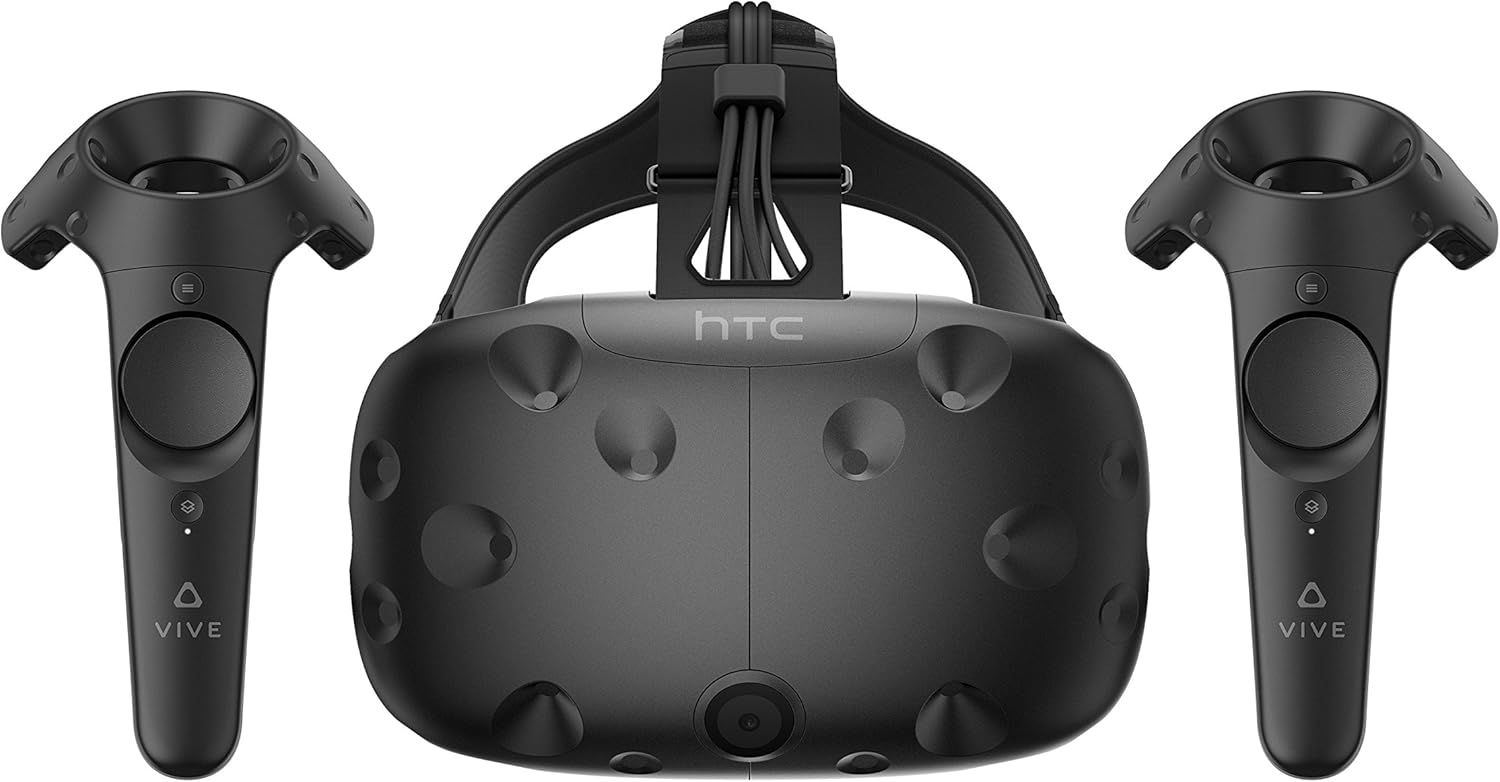
Of all the available VR headsets in the market (worldwide), the HTC Vive has been and remains as the “big boy” in VR technology. Since its inception, this device has actually been mimicked by a number of other VR kits though they do not perform a fraction of what the Vive does. This gadget is the most broad-based device in VR implementation. Currently, it is the only VR kit in the market that tracks your complete movements within an area of 10FT and uses two remote controlling base stations. This actually means it is able to immerse you fully into the virtual world. You will live it, see it, experience it and much more. Sincerely, it’s very hard to completely explore all the features of this headset presents on the table. But here are some of its features:
Features & Specs
- Connection type: cable and wireless tethered.
- Image resolution: (1080 X 1200) pixels per eye.
- Refresh rates: 90Hz.
- Software support: Stream VR.
- Hardware support: a PC.
- Field of view: 110 degrees
- Controller: HTC Vive Motion Controllers
- Connectivity: USB 3.0 and HDMI
- Sensors: camera, motion sensor, an external visual positioning sensor
- Cost: $800
Pros
- Has a wide range of wireless control space: HTC Vive has a very wide range (about 15ft.) of unbounded control.
- A huge support for both hardware and software: the Vive has also a relatively wide support community. This means, when you get a problem it is very easy to get a helping hand from the internet.
- Is very durable: in essence, this device has been offered a variable warranty with some vendors offering up to 4 years warranty. Now, only a proven durable device can be offered such a warranty of course.
- It’s open for developers: HTC Vive does not restrict programmers from throwing in their code into their gadgets. This makes it the most customizable VR headset in the market.
- Exemplary image resolution: though the Vive and the Oculus share the same measure of resolution and refresh rate, the Vive seems to have a fairly good display than the Oculus.
Cons
- It is very costly: despite all the good features, this headset is undoubtedly the most expensive to acquire. Think about this, it costs a whopping $800. Besides that, it demands that your PC has at least an i5 Intel processor and graphic card of at least GeForce GTX 970 GPU. Boy, I don’t want to be harsh with the perfectly good Vive, but that cost is just too high.
Verdict
HTC Vive is the ultimate king of Virtual reality as its performance rivals no other headset in the market. Besides, it gives you the room to begin developing some VR application that could put you ahead of modern developers. Besides, it is very friendly and it is simply the best you can get in the market. However, I only have a bone with the cost. If you have a way in which you can chew the bone, just click here, make an order and begin enjoying the vibe of HTC Vive.
…Here is something everyone must keep in mind
VR headsets may have a negative impact on one's visual ability. Prolonged usage of VR kits is not a very good practice as it can lead to impairment of the eyes or eye strain. Thus, it is very advisable that anyone should actually reduce the time taken with a VR headset.
There are two types of payments: you can pay attention, or you can pay a lot of money. Now, which one seems better for you? There are several fake VR kits dished out for sale. It is important that you always check the authenticity of the dealer before making a purchase. Otherwise, you may just end up paying a lot of money.
Could Augmented Reality (AR) be the wave of the future?
Recently, in my focus to write out product reviews, I missed writing articles that outline my thoughts or highlight recent trends. In this spirit, I thought to put out something that’s getting traction recently- Augmented Reality (AR) and Virtual Reality (VR).
Multimedia support has been the all-time game-changer in technological inventions. Thus, whenever a change in the representation of computer graphical/audio data erupts, a rapid transformation of computer generations is likely to follow. Take for instance traditional computer applications used to be controlled by some dark command-driven unfriendly terminal. This was long before the introduction of GUI (Graphical User Interface) systems (these are systems that use graphics to pass commands to the hardware e.g. the one you have used to access this page). At the moment, the popularity of GUI applications has rendered command driven interfaces to be almost obsolete. Another example is the introduction of touchscreen technology and how it paved way to modern smartphones, smartwatches, televisions, vehicle dashboards …name them.
And now, we behold in our markets two new and extremely amazing multimedia technologies: Virtual Reality (VR) and Augmented Reality (AR). Of course, VR was the first technology to be released into the market. VR’s earliest research could be dated back to 1990s. However, the technology never became very popular until 2012 when more research was pumped in by Oculus in creating the Oculus Rift VR. Later in 2014, Facebook eyed the Oculus and bought it at $2b. Since 2014, VR’s popularity seems to have exploded into the market. So, HTC threw in their Vive which has been mimicked by several smartphone companies (I mean China has done well in this), Lenovo added their Daydream, and if you have upgraded your PS to PlayStation 4, then I am certain you don’t need a definition of Virtual Reality, do you? However, not much has been disclosed of Augmented Reality at the moment. Nevertheless, AR has greatly hit the headlines in the recent years with the market’s trailblazers like Google and Apple showing the keenest interest in AR. So, I ask my question again: could AR be the wave of the future? Or could AR be just a passing fancy? Well, let’s explore.
First, what is AR? Is it just like VR?
Of course not, these two technologies are somehow distinct though they may have some similarities as well. A VR headset, for example, will completely shut your view to the external world and will immerse you into a virtual world whereby you watch a movie or play a game as though you are actively involved in a real-world 3D environment of the movie or game. Augmented Reality, on the other hand, does not deduct you from your normal environment. In AR you will just put on transparent glasses (meaning, you will view the normal environment) but AR will distract you a bit by displaying images into your real normal environment. So, if you are in VR, you will momentarily say “goodbye actual world” whereas if you are in AR you will only spice your actual world. That’s the greatest difference between the two and this is what will determine what technology is likely to survive longer and which one may soon become a kick in the dust.
What we know for sure about AR applications so far is that…
Google Glass was the earliest invention that implemented an aspect of augmented reality. Google glass displayed 2D images and the ideal concept behind it was that of having Google on everything you laid your eyes on. However, it all didn’t go well as many could have prospected. The main concern was that the health of the glass wearers was not guaranteed. Besides, there was fear of ease in breaching confidentiality where the glasses were used. Thus the Google Glass technology didn't become too popular and was eventually recalled from all social networks.
Recently, Microsoft Company threw in their AR card when they released a new headset with 3D-features that they called The Hololens. Hololens does borrow a lot from Google Glass in the representation of images. The main difference, however, is that Hololens displays 3D images, unlike the 2D images that were displayed by Google Glass. In my honest opinion, I find it hard to classify Hololens as an AR kit. This is because Microsoft has not clearly defined this headset as a definite AR headset as Google did. However, if you have seen this headset in use, it is 95% clear that the kit has not embraced a VR anatomy at all, thus the classification.
The biggest blast, however, is the rumor that Apple has been cooking a very serious AR stuff that is likely to sweep the internet as from this year.
But rumor has it that Apple is developing an AR storm…
Besides Google, Apple has been a major trailblazer in innovative technology, although Apple is very secretive. Now, this same Apple has of late been reported to be secretly working on a serious AR advancement in the past two years. Given its nature, nothing can be clearly be defined but everything is open to speculations. One main reason why many suspect this is because Apple has hired key developers of AR since then, the leading among them being Doug Bowman (America’s finest VR developer) and others like Yuri Petrov (developer Oculus) and Zeyu Li (developer Magic Leap). Besides, Apple’s CEO has consistently kept giving thumbs up to AR than VR in most of his interviews. Thus, it is very likely that Apple will blast the internet this year (when they will be celebrating their 10 years in the market) with an AR invention that could possibly pave way for more AR advancements for iOS.
The again, this year Apple has announced to release a new tool known as iOS ARKit which will help iOS developers in developing apps that feature on AR. Surely, even the doubting Thomas could have believed that Apple is obviously developing some serious AR stuff. Yes, this may take some time, but the wave of AR from Apple is oncoming in any case.
One sure bet you can be certain of is that Apple (unlike Google which released Google Glass instantly and fell) will not release all their AR inventions instantly into the market, just like they first released iPods, which paved way to smartphones, and then later tossed in their tablets, it is likely that Apple will first release AR mobile applications this year and then bring in their AR glasses next year (or something of the sort). Well, as I think about it then, AR will be the next storm waiting to sweep our markets.
Best 4 Smartwatches to buy today
Disclosure: As an Amazon Associate, Unwrittens earns from qualifying purchases. This never changes what we recommend.
A couple of years ago, watches seemed to have been wiped out of the market by the dominance of smartphones. Honestly, looking back just 7 years ago, no one thought that the big tech giants could at some time venture to invest in bringing back the good old analog watches back into the market and of course adding flavor to them with some “smartness”. But at the moment, smartwatches are not just regaining popularity, but they are slowly becoming the wave of the future for any tech-mined person. Every “Big-Boy” in technology (Apple, Samsung, Huawei, LG, Sony, Asus … name them) is striving to outdo the other in production of smartwatches.
Well, thinking about it again, smartwatches really have everything to be admired about. They will tell you the time, just like any other watch does; but they will also channel your phone’s notifications to your wrist. In addition, they will run your mobile apps (much like your phone does) and yet they will only remain as some beautiful thin band on your wrist. Modern smartwatches could even track your exercise and they will be your helping map when you get lost while hiking in the woods.
In this amazing edition, we take down the finest details of the best 4 smartwatches that you may love to try out in 2017. So are you ready? …let’s begin with:
-
Rank 1: Casio WSD-F20 (Check Amazon price and reviews)

Anybody would have guessed that the best smartwatch out there could have been either an Apple or a Samsung, but that's actually not it. Casio was and remains the best smartwatch company still. Sure. You don’t have to believe this; you only need to try it out. If you are a watch fanatic, then you know that the talk about watches is never complete if I never mentioned some Casio in the talk, or is it? Casio Company has definitely been the all-time best manufacturer of various types of watches worldwide. In the recent years, the company has actively engaged in the production of very outstanding watches in its bid to outdo competition from other established brands. The WSD-F20 is Casio’s latest smartwatch flagship that was released this year (2017) in April. Priced at $500, the smartwatch has got more that anyone could actually imagine. As a matter of fact, if you have tried out this watch, you may be forced to stop using your smartphone owing to this gadget’s unmatched capabilities. The following some properties and features that made this smartwatch the number one watch in this listing:
Properties:
- Weight: approximately 810g or 3.2 ounce
- Case Material: Resin
- Dimensions: 6.17mm diameter and 0.88 thinner than 1st gen. watches
- Color: grey/black
- Price: $500
Features:
- OS – Android 2.0 (but supports iOS as well)
- Screen: colored LCD with optional monochrome for battery saver
- Water resistant up to 50 meters.
- Watch-face enabled
- Military certification 810G
- Other features: digital compass, barometer, altimeter, Casio moment setter, a microphone and a time-piece
Pros:
- Very durable: with a military certification 810G for ruggedness, this watch is surely built to last no matter how harsh you will treat it. I mean, just consider even the fact that the watch is water resistant to a depth of 50 meters! Boy, which other watch does that out there?
- Very lightweight: weighs just about 800g which makes it very light to jog with.
- High software application support for nearly all the popular phone OS.
- Has a cute design with much resemblance to the good old G-Shock watches (if you ever bought one).
- Relatively longer battery life of up to 30 days when not running the GPS.
Cons:
- This watch is costly. Well, though it may be such a nice performer, the Casio WSD-F20 costs a whopping $500! Well, this certainly may keep many people off the Casio F20 shelves. But if you got some extra bucks to spend, go ahead, get the F20 here and feel free to share your experience with us.
Verdict:
It is the ultimate 21st-century smartwatch available in the market. Even though it is quite highly priced, I believe it is worth the cost. On a scale of 10, WSD-F20 deserves a 9.8 score.

Now, ranking between Samsung Gear S3 and Apple watch 2 does often drive me bananas. This is because these two gadgets present very close resemblance in presenting high performing feature to watch fanatics. As such, to avoid controversy, I often wish I’d toss a coin to help me decide which one should rank higher than the other. But in the sincerity of my perception and the honesty of the compiled reviews that I checked through, there is no doubt that Samsung Gear S3 has got a slightly higher market reception than the Apple Watch.
Features & properties:
So, let’s face it. This watch (Samsung Gear S3), runs on TIZEN OS and it is compatible with both Android and iOS applications. It has a 1.3’ colored LCD display and a 4GB internal memory. Besides, it has a 1.0 GHz processing speed; and boy, have I mentioned that it has a wireless charging mechanism? Its battery can normally extend a stretch of up to 3 days. The watch is currently priced at $299 in Amazon. Check it out here.
Pros:
- It has a high software support: this is undoubtedly the watch’s silver bullet to counter Apple’s Apple Watch 2 dominance in the market. Samsung Gear S3 supports iOS and Android. Think about it, though everybody could have wished to have the Apple look, it could be meaningless if the watch could not easily be compatible with my phone.
- Samsung Pay: you don’t have to use your credit card for shopping; you will only need to wave your watch and go. Sounds cool, doesn’t it?
- A very user-friendly interface: this watch is very easy to use immediately you power it.
- A bigger internal storage memory: I know nowadays 4GB doesn’t sound much (since we now have 6GB – RAM in smartphones), but 4GB for a watch is damn too much.
- Great for activity tracking: this watch will keep track of your daily exercises and with the GPS feature, it will also be very helpful if you love hiking.
Cons:
- Not water-resistant as smartwatches of its class. You might have thought that this watch too is water resistant. Sadly, that’s not the case with most of its releases. It’s only the LTE version of the Samsung Gear S3 is water resistant and it is only resistant to a depth of 1.5 meters.
- It lacks several original Samsung Apps. This somehow makes it quite hard to learn for a new user of this gadget.
Verdict:
The Samsung Gear S3 may not be the best smartwatch in the whole world, but this watch surely adds a variety of features in an ideal smartwatch that I am sure any watch fanatic could admire. Coupled with the relatively cheaper price of $299, this watch is truly something worth trying out. On an average scale 10, this watch scooped a score of 9.32 from the online ratings. Check it out here.
-
Rank 3: Apple Watch 2 (Check Amazon review and price)
Holy cow! I could not help exclaiming the beautiful design of the sporty Apple Watch 2. Well, if looks are something to go by when you buy a smartwatch, or you are just Apple fan, then you may not need to scroll any further; just pause here and make an order right here. Primarily, this watch has received very great reviews on its overall performance. When it comes to the fitness watch lovers, this watch has been appraised much like one would have embraced an experienced fitness trainer. Perhaps before, I could present my opinion, I would like to showcase the properties of the Apple Watch 2.
Features & Properties
- Operating System: Watch OS 3
- Screen size: 1.53’ OLED
- Processor: S2 duo-core
- Band size: varies with the watch size
- Memory: 8GB onboard storage but with only about 2.1GB usable
- Battery duration: can stay for about 18 hours under normal usage
- Wireless charging: enabled
- Compatibility: iOS 10 or later (models iPhone 5 and later series)
- Connectivity: Bluetooth, Wi-Fi, and NFC
- Pricing: between $339 and $549
Pros:
- It is water resistant: this means, no one needs to worry about a little rainfall while jogging or even worry if his/her Apple watch 2 falls in the dishwasher accidentally.
- Great onboard GPS: this watch has a great GPS and will definitely give you awesome directions on the map (if you care to try this out).
- A very enchanting design: (allow me to call it unisex). As noted before, this watch has a very awesome design. More so, I find it very cool with the sporty bands. It has a wide screen and it perfectly fits regardless of the gender of the one who wears it. Thus, if you wanted to buy a birthday gift yet you aren’t certain of what will fit, try this watch. It will always fit.
- A good fitness and exercising ability
Cons:
- Costly: when I consider the cost of this watch with its available counterparts, I (personally) find it somehow overpriced as it looks and performs much like many normal smartwatches that cost between $150 and $200.
- Battery: Battery life can be a real issue for some users.
- Incompatibility: even though the watch does work without the aid of the phone, it is certain that it is only limited to iOS. This means the smartwatch isn’t compatible with phones that use Android, Sailfish or Windows OS.
Verdict
Apple Watch 2 is a classy smartwatch by design, a water-resistant and a highly fault tolerant gadget. It is also hailed highly by gym lovers and athletes. This is a clear indication that this watch is great for people who love doing regular fitness exercises. However, this device has fallen short in ranking because it is quite expensive and it is not compatible with the majority of modern smartphones. The overall online ranking of this device was 9.15. Check it out here.

There is a popular notion in the West that everything that contains the label “made in China” is less durable. Not so with the Ticwatch 2. Here is the cheapest and ultimately the best option to anyone who would love to experience the fun of a wearable smartwatch but works on a very tight budget. This watch costs just $199 and it has proven to work much or less like the world’s top smartwatch brands. Honestly, it is not the very best; then again it is far better than an average smartwatch. Here is how the Ticwatch 2 performs:
Features & Properties:
- Operating System: Ticwear OS 4.8.0
- Weight: 1.6 oz.
- Color: two main colors, charcoal-black and snowy-white
- Compatibility: iOS and Android operating systems
- Battery duration: about 28 hours
- Connectivity: Bluetooth, Wi-Fi, and NFC
Pros:
- Lovely design: this watch has a very cool, simple and an enchanting design.
- Kickstarter project: If you are into supporting new technologies and innovations from start-ups, look no further. This watch is a Kickstarter project. I would say it's Must Try watch.
- It is very user-friendly: though the word Ticwear OS may somehow make you doubt its ease of use, this watch is surely very easy to learn and be acquainted with. Besides, the cool dark background of the operating system somehow makes this watch too irresistible.
- It is faster: this watch loads its applications very fast and easily. I am sure if you have used the GPS of the watch, you will agree to this fact.
- It is cheaper: rated at just $199, this is the one watch that everybody ought to yearn for.
- Very lightweight and durable.
Cons:
- Shorter battery life: this watch’s battery drains quite fast whenever it is subjected to prolonged use of GPS. However, if you kept it for just phone notifications, calls and texts, it will not run out as fast and it could help you pull through the day.
- Few application support: Ticwear OS is quite a new OS in the market and it has absolutely few applications in support, unlike the popular brands. However, if you only aim the basic applications, you will not be disappointed by this watch.
Verdict
Ticwatch two smartwatch is a great watch with an impressive speed of running application, a cool design and an extensive support for smartphones. Besides, it is also relatively cheaper and affordable. Further, you get a feeling of supporting Start-up considering this watch is a Kickstarter project. Even so, this watch has got one main drawback of its short battery life. Otherwise, if you could find a way to handle the short lifespan, then you could count it as the best smartwatch out there. The Ticwatch two scooped an online rating of 9.0. Please check it out here.
Please take a look at these smartwatches and others available on the market. The smartwatch market is highly dynamic at this time. A lot of new models are coming out quickly. Please feel free to put your comments and your impressions or preferences for smartwatches. I would love to know what my readers are prefering to wear!
Best Wireless Routers: In-depth reviews and buying guide
Disclosure: As an Amazon Associate, Unwrittens earns from qualifying purchases. This never changes what we recommend.
A wireless router is an integral part of our life and mostly the one that we pay very little attention to. In my earlier post, I described a need to upgrade your home Wireless router and suggested my favorite three Asus routers for my readers who are looking for value and not the greatest in the tech.
As promissed, this post is about unbiased all-inclusive best routers for every needs. I have researched and created a list of Best Wireless Routers in 2016 and provided my review on each one of these. Please note that since these are not the purely value-driven choice, some of the routers in this list are expensive and may not be the best pick for all users. You will need to again check the price and make a call on how much you are ready to spend for the features you are looking for your router. All of the routers in my list are “Above Average” and I am confident that if you are not sure of your need, pick the one that is least expensive or most attractive to you, it will be more than good enough.
In the list below I have used an unusual approach to providing you with the Amazon rating and Review numbers. I think it is in itself an important marker of router’s popularity and reliability that I myself find it very useful when researching for a new product.
|
Routers |
LAN Ports |
Wireless Band |
Amazon Rating |
Amazon Price |
|---|---|---|---|---|
|
Asus RT-AC88U Dual-Band (Best Choice) |
8 |
802.11 b/g/n |
4 (> 4,700 reviews) |
|
|
D-Link DIR 890L Tri-Band (Best Choice) |
4 |
802.11ac |
4 (> 760 reviews) |
|
|
NETGEAR Nighthawk R8000 Tri-Band (Best Gaming) |
5 |
802.11 b/g/n/ac |
4.5 (> 10,000 reviews) |
|
|
ASUS RT-AC3200 Tri-Band (Top of the consumer line) |
4 |
802.11 a/b/g/n/ac |
4 (> 535 reviews) |
|
|
Linksys WRT1900ACS (Best for DD-WRT) |
4 |
802.11ac |
4 (> 4,000 reviews) |
|
|
NETGEAR Nighthawk R7000 Dual-Band (Better value under $200) |
4 |
802.11ac |
4.5 (> 10,000 reviews) |
|
|
Asus RT-N66U (Best Value under $100) |
4 |
802.11 b/g/n |
4 (> 6,070 reviews) |
|
|
Apple AirPort Extreme (For Apple user or fans) |
3 |
802.11ac |
4.5 (>2100 reviews) |
Before I go into more details of router’s review, here are the two popular routers that are not on my list and the reason for it:
TP-Link Archer C7: A solid router but I think my best value pick- Asus RT-N66U is a better choice in same price range.
Netgear R8500: A solid router but is extremely expensive and do not justify the price tag for what it offer and is available for lower. Maybe a year or later, the price is expected to decrease and then it may be a worthy router.
Asus RT-AC88U – The best wifi router to buy in 2016-2017
 Asus routers are my personal favorite. ASUS RT-AC88U, the router is priced under $300 and it is one of the best wireless routers you can buy right now.
The RT-AC88U is an AC3100 router and is a feature loaded, dual-band router capable of NAS. It comes with a total of 8 Gigabit LAN ports capable of delivering high-speed internet without any issues. Asus also has very well made web interface, super intuitive and easy to use. The WiFi performance of the router on both 2.4 gigahertz and the 5 gigahertz bands are as best it can get.
RT-AC88U offers a stylish sleek look and it aesthetically pleasing with its complete black construction with red accents along the antennas that mix well with products of gaming lineup by Asus.
The installation process of RT-AC88U is a very easy because of the amazing web interface. When you connect the router to the PC and internet for the first time and power on the PC, the Asus Web Interface will automatically launch and give you two options to configure the router. Either you can continue with the wizard or you can configure it manually. The Quick Internet Setup wizard, will check your internet connection and configure your router. After that, it allows you to set a name for each SSID, and then create a network encryption key for each band and it’s all done and running.
The Asus RT-AC88U provides multi-client MU-MIMO data streaming, is extremely fast on both bands (2.4 GHz and 5 GHz) and File reading/writing and transfers were smooth. The router is perfect if you are ready to spend a little more money over my value pick and it has plenty of features to brag about that makes it a worth higher price.
Pros: 8 Gigabit LAN ports; Reliable WiFi performance; Asus web interface that’s one of the best
Cons: Slightly higher price but still justifiable

The next in the list is a top tier wireless routers from D-Link. D-Link AC3200 Ultra Wi-Fi DIR-890 is very attractively designed wireless router with an overall red build with black accents that can be appealing to gamers out there. The DIR-890 has amazing speed and functionality. It is a tri-band router so it can be too much for the regular consumer.
The router is fast, easy to setup and use, and has a superb speed and Wireless range. This router can be doubled up as a NAS by adding an external hard drive.
DIR-890 manages to give you a respectable performance with incredibly fast and problem free Wi-Fi with decent range, outstanding build quality, and pleasing design. It is easy to setup and easy to use. One drawback is that the antennas can’t be detached.
Pros: Easy setup; Build quality and design; WiFi performance and speed
Cons: The antennas cannot be detached
Netgear Nighthawk R8000 X6 – Excellent for Gaming

Netgear Nighthawk R8000 is upgraded from earlier model Netgear Nighthawk R7000 and you will pay a hefty price for it. R8000 is a compliant, tri-band router, and comes with enough features that will make you ignore the price point and get it anyway.
The Nighthawk AC3200, although has a similar color scheme as of R7000, it is comparatively larger. It has beautiful six antennas that can be collapsed with ease. The design and antennas make the router look epic. The Nighthawk AC3200 manages to give the superb performance as its younger sibling did. You might rightly think that then it’s a waste of money in that case. It can be doubled up as a NAS if you attach an external hard drive and the performance of NAS is quite good compared to other routers in this price range. It has superb speeds over the 5 GHz band but on the 2.4GHz band is it can be better.
The Netgear R8000 Nighthawk X6 AC3200 gives you amazing performance over the 5 GHz band and has a stellar performance as a NAS due to one of the most powerful hardware in a wireless router.
Pros: Best for gaming- Powerful hardware for fast WiFi and best NAS performance
Cons: WiFi range on 2.4GHz is not the best; Software
Asus RT-AC3200 – One of the best Tri-Band Router

If you are ASUS fan or just looking for a classy design in the router that is packed with features and loaded as it can get, get the Asus RT-AC3200.
Asus RT-AC3200 is a tri-band router with a hefty price tag but has lot of unique features that can justify the heavy price tag. The router sports 6 antennas that can be detachable and replaced by more capable ones. The router is a bit lacking on the LAN ports as it only happens to have 4 of them. The router comes with incredibly powerful hardware and the speed on all the bands is flawless. Moreover, the router can work as a NAS server as well as OpenVPN server- I love it.
Two key features that I like the most are; (1) Smart Connect that automatically selects the fastest band for all devices individually, based on their demands and capabilities, (2) Protection with Trend Micro with triple-strength total network security, plus robust parental controls and privacy protection. AiProtection with Trend Micro for complete network security
Pros: Powerful hardware; Unique and useful features that can justify the higher price
Cons: Price
Linksys WRT1900 AC – Best DD-WRT WiFi Router

The Linksys WRT1900 is a dual-band wireless router. It has 5 GHz band with a speed of 1,300 megahertz and the 2.5 GHz band with a speed of 600 megahertz. This router has classic design and color scheme found on Linksys routers for quite some time and is bulky with only 4 antennas.
The best appeal of this router is the firmware that it doesn’t have but can support (DD-WRT)! The router also is one of the fastest, easy to set up, and loaded with features. It also has a capability of NAS and the NAS performance is superb. The wireless performance on both bands is amazing, and the router performs without any hiccups.
The software is confusing for new users but it comes with an incredibly powerful hardware, amazing WiFi range, and speed as well superb NAS support. Not to forget the DD-WRT as this router is Open Source Ready and users can gain unprecedented access to customize the router.
Pros: WiFi Range; DD-WRT firmware support;
Cons: Price; Software
NETGEAR Nighthawk R7000 – AC1900 Dual-Band Router (Best Router under $200)

This Netgear router is PCMAG’s Editors’ Choice. The Nighthawk R7000 is AC1900 with 1,300 Mbps speed in the 5 GHz band and a 600 Mbps speed on the 2.4 GHz band. The Netgear Nighthawk R7000 looks awesome as well. R7000 is also more affordable over R8000 and easy to install.
The Nighthawk AC1900 comes with 3 detachable antennas and overall, it’s an impressive router that offers a lot for the price you are paying for it. However, it is very bulky, heavy on weight and has some performance issues on the 2.4 GHz band. The software is adequate but can be better.
On the 5 GHz band, the Nighthawk gives an amazing, unparalleled performance, has a slew of features that are usually not expected in affordable routers.
Pros: Performance on 5GHz; Features
Cons: Software; 2.4GHz wifi
ASUS RT-N66U- The best all-around router under $100

This Asus router is my personal favorite. It was the first N900 router from Asus, and even after more than 3 years it is still best. Its diamond-black sleek design still looks classy. It has 3 detachable antennas raising up from its back sending the signal to all areas of your home.
This is a Dual-band N900 router, both of its 2.4 GHz and 5Hz frequency band are capable of giving you 450Mbps each and is very reliable. It has 4 LAN ports and 1 WAN port. Besides these, there are 2 USB ports, a Wi-Fi Protected Setup (WPS) button, and a power button. You can also make these routers a Mobile Hotspot. Asus also has a very good web interface that is easy to navigate and feature rich.
My favorite features of this routers are “Download Manager” and “VPN Server” that adds terrific value. There are plenty of other features that I love.
If you want to upgrade your cheap router or need a replacement and don’t want to keep researching. I recommend you stop here and just get this router. You can never go wrong with it and I believe there will not be a feature that most user will miss.
Pros: Great features to price ratio; VPN server support
Cons: N900 router is now a bit old
Apple AirPort Extreme Base Station – A router for Apple fans

This router is especially appealing to Apple fans or to the people heavily invested in Apple ecosystem! However, as typical of Apple, the design is sleek and performance is pretty good.
AirPort Extreme is a dual band router and supports the latest Wi-Fi standards. The router is fast in all aspects and reliable. On the other hand, if you are looking for feature pack router, this is not one of that and you may also not get the latest and best in the upgrades for the amount of money you pay. Overall the design and performance are outstanding but it's the lacking in terms of features.
Pros: Design; WiFi performance
Cons: Features; Flexibity; Price
Wireless Routers: Terminology
Buying appropriate Wireless router for your need and preference is not as simple as it may look.
A wireless router: A router is consists of the router, a network switch, and a wireless access point. It is responsible for sending data from all of the devices in your network to the other networks. A network switch connects all your devices that are running on WiFi to other wired devices using Ethernet cables. The wireless access point is a station that has an antenna and is responsible for transmitting and receive wireless signals.
Dual Band Routers: This is the most common type of routers. It refers to the capabilities of a router to operate on 2 different frequencies; 2.4 GHz and 5 GHz.
Tri-Band Routers: While dual-band routers broadcast two separate signals, tri-band routers broadcast three different signals. They can host three different Wi-Fi networks at once. A tri-band router actually hosts a 2.4 GHz signal and two separate 5 GHz signals. Why do you need a separate 5 GHz Wi-Fi signal? Well, because Wi-Fi networks suffer congestion. A tri-band router host two separate 5 GHz networks, and it automatically sorts devices into different networks. This offers more speed to share among your devices. Note that it won’t actually speed up a single device — that device is only connected to one of those networks at a time — but it will offer more speed to additional devices you add.
N600 Routers: For those who don’t know, the N600 routers are the routers that have a combined speed of 600 Mbps evenly divided between the 2.4 and the 5 gigahertz bands.
N900 Routers: These routers are an upgrade over N600. They have a combined speed of 900 Mbps that is evenly divided between the 2.4 and the 5 gigahertz bands.
AC1750 Routers: These routers offer a combined high speed of 1750 Mbps, however, the speed of these routers isn’t evenly split. The 2.4 GHz band gets a speed of 450 Mbps, and the 5 GHz band gets the remaining 1,300 Mbps speed.
NAS: NAS refers to Network Attached Storage. Many flagship wireless routers come with the support for external hard drive, this means that you can easily plug in your external hard drive to the port that is available on the wireless router and the content you store over there will be available for all of the network attached devices to consume.
Conclusion:
Considering how the market of wireless routers is very competitive and plenty of options to choose, you will need to work a little hard to find the best router for your need and list provided can help you sort out the possible candidates.
Good luck!
3 best ASUS wireless routers to unleash true potential of your home network
Disclosure: As an Amazon Associate, Unwrittens earns from qualifying purchases. This never changes what we recommend.
In most homes, Wi-Fi router is probably not a device that people think for its capabilities beyond reliable Wi-Fi signal. However, I strongly believe that router is the most important tool, in fact, a center point, of your home network. It can do a lot of heavy lifting if right model is used and setup strategically.
In my home, my router is a media server, VPN server, Download manager, has small network storage, act as a hardware firewall, used for parental control and of course provides very reliable Wi-Fi signal for my personal home network and a secure Guest network. So, if you are still using an old cheap router, please do me a favor and upgrade your router. There are too many great routers in the market today. Below are my top choices that you can use depend on what you like, what you want to get out of your router and at what cost.
Why I like ASUS routers: I am a big fan of ASUS routers due to its powerful firmware that is almost comparable to DD-WRT open source firmware in terms of advanced features. It is very regularly updated and has very active and enthusiastic user base to help you find a solution to your issues online. No wonder why these routers are near and dear the heart of a lot of power users.
Please note that I have no affiliation with ASUS. My recommendation in this post are purely because it’s my personal favorite.
Here are my wireless router recommendations to unleash true potential of a home network:
ASUS RT-N66U
The best all-around router that is powerful, feature-rich, and a terrific value today (Being a bit old model)
This Asus router is my personal favorite. RT-N66U and RT-N66R both are an identical model so you can choose to get whatever has a lower price.
It was the first N900 router from Asus, and even after more than 3 years it is still best. Its diamond-black sleek design still looks classy. It has 3 detachable antennas raising up from its back sending the signal to all areas of your home.
This is a Dual-band N900 router, both of its 2.4 GHz and 5Hz frequency band are capable of giving you 450Mbps each. It has 4 LAN ports and 1 WAN port. These are Gigabit Ethernet ports and if you don’t want a wireless connection, you can connect Network cable in it. Besides these, there are 2 USB ports, a Wi-Fi Protected Setup (WPS) button, and a power button. You can also make these routers a Mobile Hotspot. Asus also has a very good web interface that is easy to navigate and feature rich.
My favorite features of this routers are “Download Manager” and “VPN Server”. There are plenty of other features that I love. Earlier, I have posted a tutorial on how to setup your own personal VPN server at home using this router.
If you want to upgrade your router or need a replacement and don’t want to keep researching. I recommend you stop here and just get this router. You can never go wrong with it and I believe there will not be a feature that most user will miss.
Check out the ongoing price for Asus RT-N66U and Asus RT-N66R Amazon and just get it yours without hesitation.
ASUS RT-AC88U
If you are ready to pay more for upgraded version of the router that comes with lot more speed over RT-N66 version, go for Asus RT-AC88U. RT-AC88U comes with the speed rating of 2100Mbp and a host of other features. Please keep in mind that these speed improvements will not make any improvements in your web browsing and internet download speeds over N66U/ N66R routers. It can primarily affect local LAN speed.
This is probably one of the best Prosumer routers but I believe it is overkill for normal use or less active home user. It also cost a lot more over RT-N66R and RT-N66U. Check out the ongoing price for Asus RT-AC88U on Amazon.
ASUS RT-AC3200
The Asus RT-AC3200 is a Tri-Band Wireless Gigabit Router with powerful hardware and superb performance. I think this is too advanced router for most home use. No doubt it’s a top of the line router from the Asus. The router has the ability to keep malware from entering your home network, and it can also work as a powerful VPN/NAS server. However, for most homes, I think this is an overkill and cost too much more over RT-N66R and RT-N66U. Check out the ongoing price for Asus RT-AC3200 on Amazon.
Although I have listed three Asus router in my post, there are many other great routes from competitors. Check below routers that have very high rating and user recommendations. Although I have not yet reviewed them personally, I don’t think you can go wrong with them. However, you may need to do more research on your own about capability and features. You would need to weigh your need, cost, and features carefully to make an informed choice.
Other highly ranked routers to check out: Linksys WRT AC 1900ACS, TP-LINK Archer C7 AC1750, Netgear AC1750
Summary
To summarize, if you are still using cheap Wi-Fi router, I highly recommend you to upgrade your router. Asus RT-N66U or N66R offers best value in routers today and is plenty for most users. If your need power and features beyond what RT-N66U offers (I think it’s unlikely for most users), pick alternatives.